



Ah, the LinkedIn quotas! Who among us network professionals hasn’t pulled our hair out because of them? And if you thought 2026 would bring relief… prepare to be disappointed. Not only do these LinkedIn limits remain the same in 2026, but there are also whispers that they could get even stricter.
A leap back in time is in order. March 2021, LinkedIn’s big decision to implement quotas. But why on earth such a measure? Quite simply, to preserve the very essence of the network: its quality.
With the emergence of automation tools, the platform was in danger of becoming a soulless battleground. So, to safeguard its authenticity, LinkedIn said “stop”. And you’re wondering how to keep prospecting at scale anyway? Patience, we’ll get to that in the conclusion.
But before we go any further, let’s destroy a false belief. Did you think that a premium LinkedIn account gave you access to more connection requests? Wrong! And if you notice differences between your account and that of your colleague, that’s normal.
LinkedIn likes to surprise by continually testing new features, including limits, on random groups of accounts. This explains some of the nuances in the figures we’re about to describe. Come on, let’s go!
LinkedIn limits on connection requests
100 to 120 connection requests per week for 1 LinkedIn account. It’s also highly recommended to spread them out, around 20 to 25 a day, rather than sending 100 at once on Monday at 9 a.m. This limit resets every Sunday at midnight.
When we know that good statistics for a prospecting campaign are a 30/40% acceptance rate (even 50%) and a 20/25% response rate, that’s about 10 engaged conversations per week.
Not enough to feed one of your sales reps for a whole week! Today, to multiply your weekly volume of connection requests, you need to equip your sales reps or recruiters with several dedicated LinkedIn accounts from MirrorProfiles.
On average, our clients set up between 5 and 6 accounts for 1 SDR or 1 recruiter. This lets them send out between 500 and 700 connection requests per week and generate around 60/70 conversations with new prospects. That’s enough to fill the diary with qualified appointments!
LinkedIn limits on profile visits
0 visits per day for a standard LinkedIn account or a MirrorProfiles account without Sales Navigator. Between 50 and 80 for LinkedIn accounts with a Sales Navigator or Recruiter license. A profile visit provides the following information:
“website”: “”, “linkedin_profile_handle”: “”, “first_name”: “”, “last_name”: “”, “full_name”: “”, “industry”: “”, “headline”: “”, “summary”: “”, “languages”: “”, “skills”: “”, “sales_navigator_profile_id”: “”, “linkedin_profile_id”: “”, “tracking_id”: “”, “linkedin_profile_url”: “”, “profile_country”: “”, “profile_language”: “”, “location”: “”, “profile_image_url”: “”, “experiences”: “”, “job_title”: “”, “education”: “”, “school_name”: “”, “linkedin_school_url”: “”, “volunteer_experiences”: “”, “number_connections”: “”, “description”: “”, “company_name”: “”, “company_employees_range”: “”, “company_industry”: “”, “linkedin_company_url”: “”, “current_job_title”: “”, “current_company_name”: “”, “current_company_url”: “”, “number_followers”: “”, “linkedin_people_post_search_url”:
It’s important to know what information you can see, because that’s what will enable you to bounce back. For our part, we use Airtable as a CRM. Particularly if you do email marketing and you need the following 4 pieces of information to enrich your professional email:
- First name
- Last name
- Company
- Domain name
The last one can only be obtained by visiting the LinkedIn company page, so for this you need the “linkedin_company_url” information. If you’d like some help with your databases, I recommend Stepward, an agency specializing in outbound marketing.
LinkedIn limits on visits to company pages
From 80 to 100 visits per day for a standard LinkedIn account or a MirrorProfiles account without Sales Navigator. Between 120 and 180 for LinkedIn accounts with a Sales Navigator or Recruiter license.
This action will retrieve the following information:
“category”: “”, “company_name”: “”, “description”: “”, “number_employees”: “”, “employees_estimate”: “”, “sales_navigator_employees_url”: “”, “growth_one_year”: “”, “growth_two_years”: “”, “growth_six_months”: “”, “sales_navigator_headquarters_url”: “”, “sales_navigator_company_id”: “”, “linkedin_company_url”: “”, “profile_image_url”: “”, “sales_navigator_company_url”: “”, “specialties”: “”, “website”: “”, “year_founded”: “”, “type”:
It’s very important to collect this kind of data, especially for your lead generation campaigns. This will enable you to hyper-segment and ultimately adapt your copywriting to maximize the performance of your campaigns.
LinkedIn limits on requests to follow a company page
If you’re an administrator, you get 250 credits per month. Otherwise, you get 50 invitations per month. To learn more about the difference between credits and invitations, I invite you to take a look at this article.
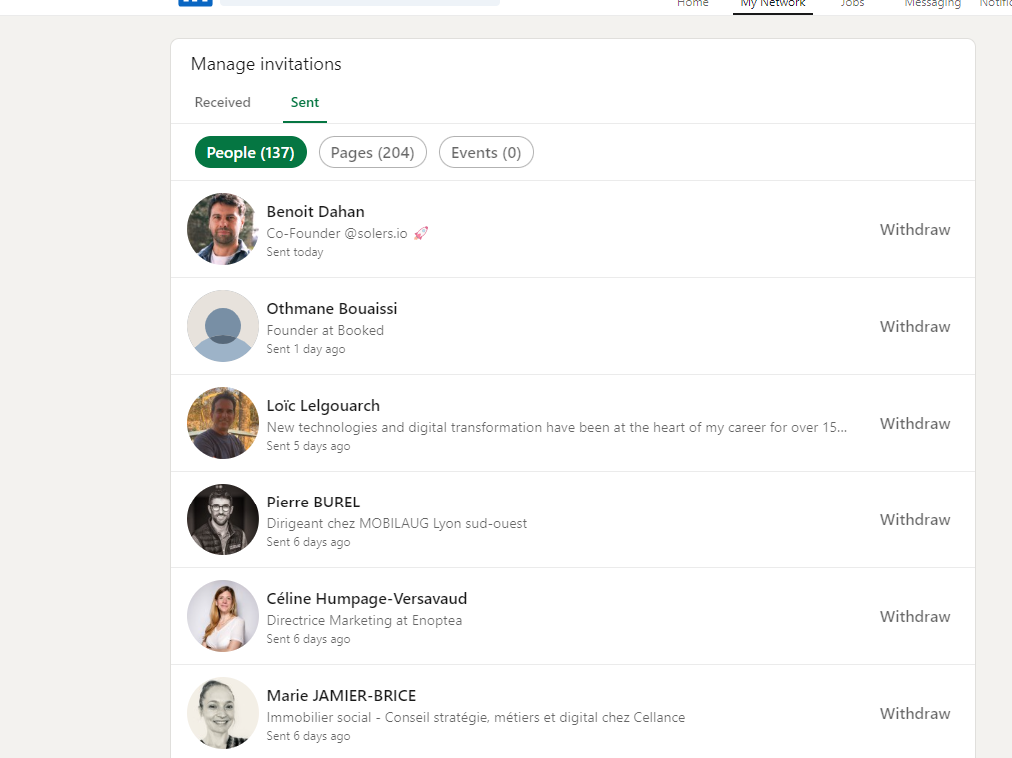
LinkedIn limits on the number of pending connection requests
It’s a special, little-known limit. If your pending connection requests represent more than 80% of your current network, LinkedIn takes notice.
In fact, if you send a lot of connection requests and only a few people accept you, your account starts to look suspicious when it comes to automation.
We therefore advise you to delete them manually, as automation tools tend to do it in bulk, which is exactly what you want to avoid. Today, only HeyReach has this feature built into its automation campaigns. It’s extremely practical!
LinkedIn limits on the number of messages sent
At present, the limit is around 40 messages per day per account.
That’s enough, because then you have to respond to each person. Responsiveness is key on LinkedIn.
To stay responsive when several accounts are running, centralize the conversations in your CRM or in the inbox of your automation tool, and prepare a few standard replies for the questions that come up most often.
LinkedIn search limits
Have you ever received the famous “Too many requests, try later” message?
To protect its network, LinkedIn may temporarily prevent you from carrying out new searches. Don’t worry, this limit is renewed every day. On average, we recommend no more than 25 to 30 searches a day.
LinkedIn limits on search volume
The search volume allowed varies according to the type of LinkedIn subscription:
- With LinkedIn Classic: you won’t be able to see more than 1,000 people at a time.
- With LinkedIn Sales Navigator: you can see up to 2,500 people and 1,000 companies.
- With Recruiter Lite: the ceiling is set at 1,000 people.
So when you’re doing your research, make sure you stay within these limits.
Conclusion
Faced with these strict limits, how can you avoid feeling too small on LinkedIn? There’s a straightforward way through: LinkedIn limits each account, and no automation tool changes what a single account can do. So the solution is to multiply the accounts, each staying within its own limits. That’s exactly what MirrorProfiles offers.
With this service, you rent dedicated LinkedIn accounts, manually warmed up over 4 months with more than 500 real connections, fully customizable and ready for automation. You run your own tools and campaigns; MirrorProfiles provides the accounts and one platform to manage them all.
Founded by the Stepward team in 2022, MirrorProfiles offers native integrations (GetSales, HeyReach, SalesForge, Waalaxy) and is compatible with any secure LinkedIn automation tool. In practice:
- With 10 accounts, your weekly volume rises to 1,000 to 1,200 connection requests, each account staying within its limits.
- The accounts are rented by the company, with no commitment and monthly billing, so your network and conversations stay in-house when a teammate leaves. Replacement in under 48 hours when needed.
Rated 4.7/5 on more than 50 reviews on Trustpilot, MirrorProfiles is used by sales and recruitment teams that want to scale their LinkedIn outreach. With LinkedIn constantly evolving, isn’t it time to stay one step ahead?











