



Introduction
Growing a business is a constant quest for any entrepreneur. The key? Prospecting. Whether it’s inbound marketing such as SEO and SEA, or outbound marketing such as outbound prospecting and networking, the fundamental questions are always the same: Where are my prospects? Which platforms do they use most? Which acquisition channel should I choose to contact them? In this article, we’ll focus on LinkedIn. How do you know if your prospects are on LinkedIn, and how do you find prospects on LinkedIn? That’s what we’re going to find out.
Create your persona or your ICP
First, you need to establish your personas, identify your main categories of prospects and your target sectors. Although this is a crucial task, don’t dwell on it for too long. It will be essential to move quickly into action to validate your assumptions.
What is a persona?
A persona is an imaginary figure symbolizing a target group. During its creation, this figure is given various attributes that complete its profile, reflecting the specific features of the group in question. These particularities allow teams to design usage scenarios for a product or service and to determine a positioning, promotion or distribution strategy. For each persona, the aim is to step into their shoes, form a mental image of them and understand how they think and act, so as, ultimately, to find a solution to their problems. Once you have internalized their profile, all that remains is to identify an answer to their problems in order to offer them your products.
What is an ICP?
The ICP, or Ideal Customer Profile, is a marketing term used to describe a fictional profile representing the perfect customer for a given product or service. This profile is based on specific characteristics such as company size, industry, geographical location, budget, technological needs, challenges faced, etc. An ICP is the conceptual representation of a fictional company that benefits greatly from your product or service and, in return, brings substantial value to your business: it’s the customer that costs the least to acquire, is loyal, has a high customer lifetime value (i.e. the value the customer brings over their lifetime as a customer) and becomes a true advocate of your brand.
What are the differences between a persona and an ICP?
The difference between a persona and an ICP is like comparing a detailed portrait with a line drawing. The persona is a detailed profile, while the ICP focuses on the company as a whole.
The persona is a detailed analysis that creates a fictional profile of a typical customer. For example, if you sell management software for small businesses, your persona might be “Sophie, the manager of a clothing store, aged 30 to 40, looking for a solution to simplify her inventory and accounting management.” The persona encompasses Sophie’s specific needs, goals and challenges, making it possible to create marketing messages that resonate with her and other customers with similar needs.
On the other hand, the ICP (Ideal Customer Profile) is a broader, targeted description of the ideal company you should be selling your products or services to. Continuing the previous example, the ICP might be “Small retail businesses, located in urban areas, with annual revenue between 100,000 and 500,000 euros, that urgently need to digitize their management processes.” The ICP focuses on the attributes and needs of the company as a whole rather than on the individuals who work there, allowing you to align your sales and marketing efforts with the accounts most likely to convert into customers.
Find prospects on LinkedIn: build your targets and size the pool
Starting from your Ideal Customer Profile (ICP), it makes sense to segment this information into different categories to define your targets on LinkedIn.
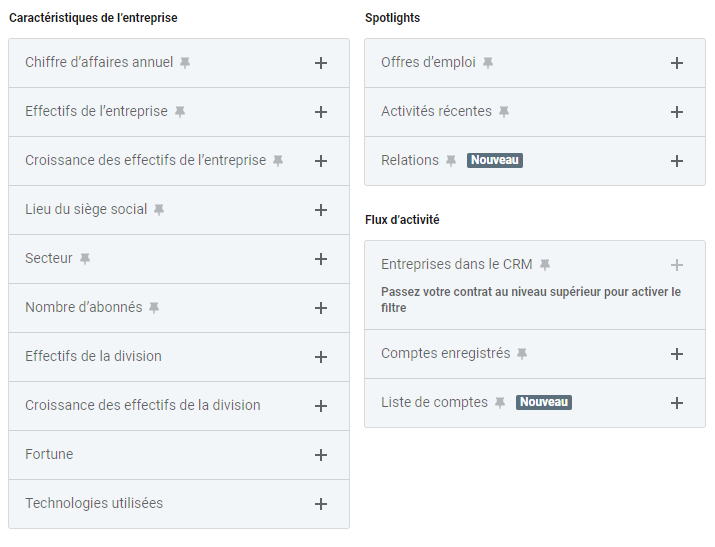
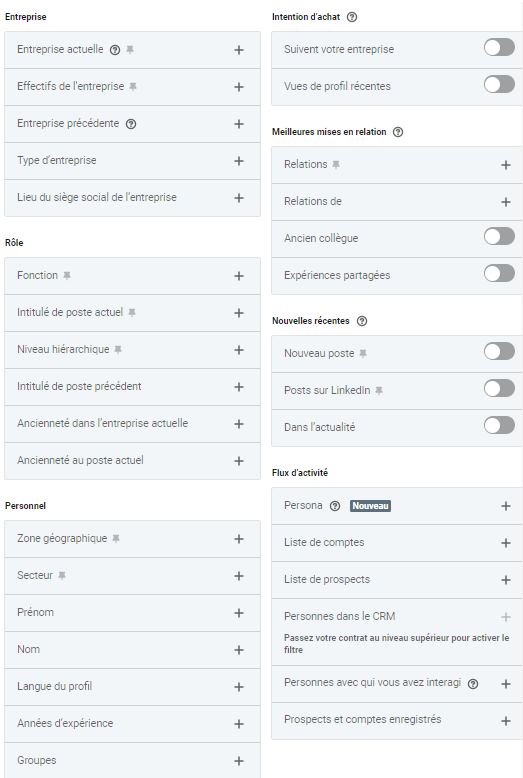
It’s essential to point out that to build your targets on LinkedIn, you will need the Sales Navigator tool. Wondering why? You’ll find all the details in this explanatory article. You also need to be familiar with all the filters available to you.
For the company filters:
For the lead filters:
Once you have prepared all this information, it’s up to you to convert the details in your Ideal Customer Profile (ICP) into LinkedIn targets. For some elements, such as job title or company size, the task is simple, but for others it can be more complicated. This is particularly the case for revenue, as LinkedIn focuses mainly on people data and is less effective at handling other types of data, particularly financial data. Using analysis and segmentation tools can help overcome these challenges.
To convert revenue into a LinkedIn filter, it can be useful to look for sector-specific information. For example, a company selling physical products can easily generate 1 million in revenue with a team of 11 to 50 people. If you’re targeting service companies generating more than 4 million in revenue, you’ll need to combine your “Industry” filter with a company size of between 50 and 200 people.
Need help? Contact Stepward, an agency specializing in outbound prospecting.
Once this work is done, all you have to do is look at the number of results:
Bear in mind that, on average, a margin of 10 to 15% is needed to estimate your pipeline correctly. If the number displayed is 10,000 results, your prospecting pool will therefore be between 9,000 and 11,000 people, which is enough for prospecting.
In conclusion, if the number of results is above 2,000 people, your target is present on LinkedIn. Below this threshold, manual prospecting may be more appropriate. Above it, automation becomes necessary: How can I boost my company’s growth through automation?
Now that we’ve started defining our LinkedIn targets and confirmed that some elements of our ICP are on this platform, it’s time to move on to the next step: prospecting. The first task concerns data.
Use your competitors’ connections
It can sometimes be easier to convince someone who already uses a service similar to yours. A good way to find these prospects is to look at your direct competitors’ connections on LinkedIn. By viewing your competitors’ profiles, you can identify and target people who are already familiar with your sector and who may know the benefits of your solution, which can improve your conversion rate.
Monitor interactions on posts
Another way to identify potential prospects is to monitor interactions on your own posts. People who like, comment on or share your content are showing an interest in what you offer. They are therefore a prime target for prospecting. By engaging in conversation with them, you can turn this latent interest into a business opportunity and strengthen your presence on the platform.
Use the “People also viewed” section
When you view a relevant profile on LinkedIn, the “People also viewed” section can suggest other similar profiles. Using this feature can help you discover more prospects who share the same characteristics and interests as the one you’re looking at, thereby expanding your pool of potentially interesting contacts.
How to build databases for LinkedIn prospecting
To transfer information from LinkedIn to your CRM, you will need a data export tool. LinkedIn doesn’t allow you to download its data directly, and doing more than 1,000 copy-pastes makes little sense. So here is a non-exhaustive list of simple export tools you can use on LinkedIn to optimize your prospecting process.
- Captain Data: This is a no-code automation platform that browses the web to retrieve data for you. The vendor specializes in data extraction, enrichment and automation. It is therefore able to retrieve information from Sales Navigator and export it as a CSV for your prospecting.
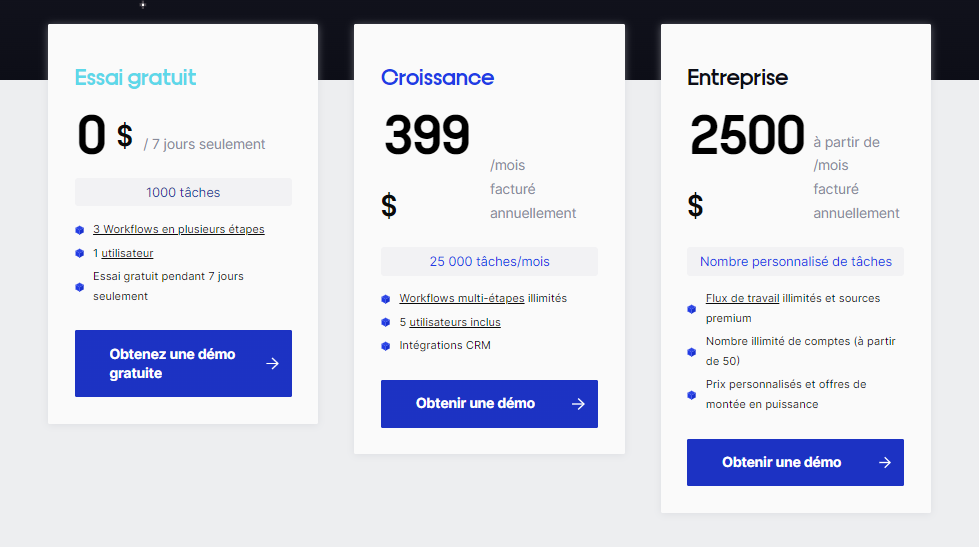
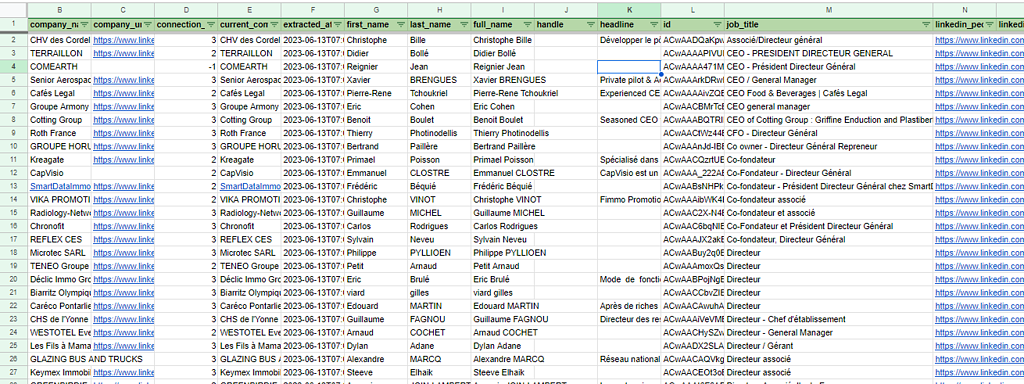
Here is an example of what you can get with Captain Data, a tool used by the outbound prospecting agency Stepward.
The most important data to retrieve is:
- company_name
- company_url
- connection_degree
- current_company
- first_name
- last_name
- full_name
- headline
- id
- job_title
- linkedin_profile_url
- location
- sales_navigator_profile_id
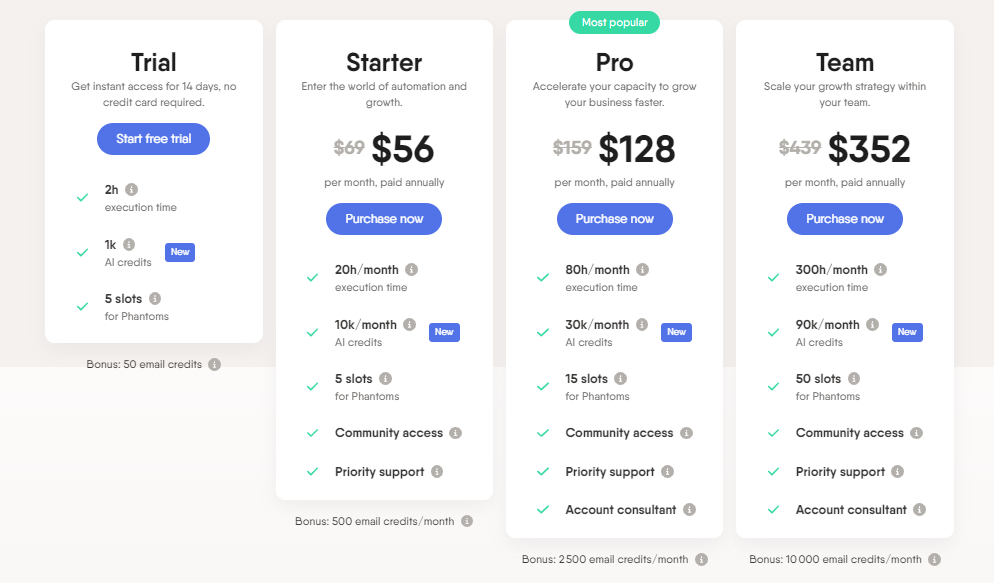
- Phantombuster: This is a SaaS platform that any developer can use to add an API to any website. It also lets you export Sales Navigator searches for your prospecting.
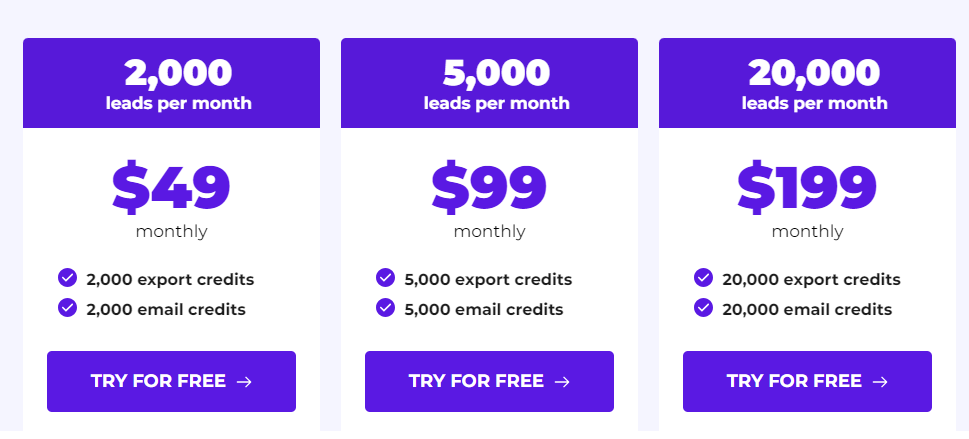
- Evaboot: This is a smart export tool for LinkedIn Sales Navigator that retrieves, cleans and enriches any LinkedIn Sales Navigator search in one click.
With all this data in hand, it’s now up to you to take action!
Prospecting on LinkedIn is an essential dimension of modern sales strategy. Identifying your targets is paramount before trying to reach them. The persona and the ICP are there to lead you to the right targets. Once your analysis is done, you’ll be able to reach your precise targets thanks to data export tools and well-defined analysis methods, which can considerably improve the effectiveness of your prospecting campaign.
To find out more about how to prospect these targets and make effective use of the data collected, you can read this article: Sales Machine LinkedIn. It details the techniques, tools and tips that will help you turn this information into real sales opportunities.
What’s more, this approach isn’t limited to LinkedIn. It also opens up prospects for emailing, another powerful prospecting channel. Combining these two methods can create a complementarity that increases the reach and effectiveness of your prospecting efforts. Whether it’s automating email sending or segmenting your lists, emailing offers many possibilities for reaching your targets in a more personalized and engaging way, thereby strengthening your marketing strategy.
In short, by combining the power of LinkedIn with other prospecting channels such as emailing, and relying on the right tools and techniques, you can build a robust and responsive sales machine. This will enable you not only to find new potential customers, but also to convert them into loyal customers, contributing to the growth and success of your business.











