



LinkedIn company pages are often overlooked on this network. Most people prefer to publish on a personal LinkedIn profile (their own, or one of their MirrorProfiles accounts) rather than on their company page, but this trend is changing. For several months now, LinkedIn has been working to make company pages more relevant to visitors. More than a simple showcase in your overall communication strategy, company page content is likely to be favoured more and more by LinkedIn. This direction aligns with its desire to further professionalize the network and highlight high value-added content.
Faced with these changes, it is worth working now to increase LinkedIn company page followers and expand your audience. The question then arises: how do you generate more followers and more engagement?
The basic technique: Invite your network to follow your company page
LinkedIn is a formidable platform for companies looking to strengthen their digital presence. A company page lets you showcase your brand, your products or services, your news and much more. One of the most basic strategies for increasing the visibility of your company page is to invite your existing connections and followers to follow it.
In short, to have a strong company page you need a strong LinkedIn profile. A LinkedIn company page is a perfect communication tool to reinforce your brand image, increase your visibility and expand your network of contacts on social networks. It is an effective way to inform your audience, build loyalty among your existing followers through quality posts, and attract new ones.
First observation: as administrator of your company page, you can only invite your own 1st-degree connections and followers to follow it. Consequently, you will need a large, high-quality network of 1st-degree connections to increase the visibility and engagement of your company page.
Here are the steps to invite your network to follow your page:
- First, log in to your LinkedIn account. Once you are on your home page, look at the top of the screen and you will see a tab entitled “You”. Click on it.
- A drop-down menu will appear; select your company page from the list.
- Once you are on your company page, look at the right-hand side of the screen: you will see an “Invite connections” option. Click on it.
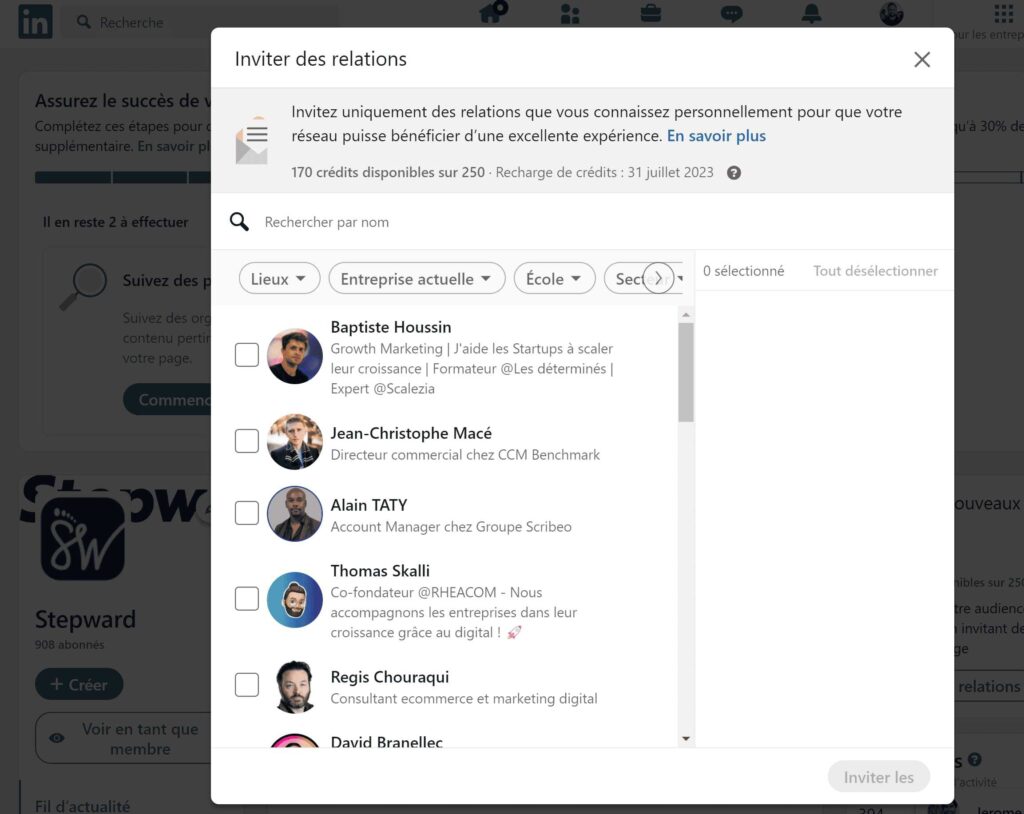
- A new window will open displaying all your current connections on LinkedIn. This window lets you filter your contacts according to various criteria, such as industry, position, geographic location, etc. You can use these filters to refine your invitation list.
- Once you have selected the connections you wish to invite, simply click on the “Invite” button.
It is important to note that sending out invitations should not be done lightly. Avoid sending invitations to people who have no interest in your business. It is better to take the time to analyze your contacts and target those who have a direct link with your field of activity, or who could potentially benefit from your services or products.
Of course, don’t waste time manually ticking each person you wish to invite. Use the filters instead, and take advantage of one of the many Chrome extensions that let you check all the boxes with a single click. We use the extension Click all checkboxes.
The technique is simple and effective, but you may have noticed in the image below that there is a number of monthly credits. This number corresponds to the number of invitations you can send. Let’s see how it works.
The subtlety of invitation credits
LinkedIn caps the number of invitations you can send each month from your company page. As a page administrator, you have 250 credits per month. Each time you send an invitation, you use one credit. However, if a person you invited accepts to follow your page, that credit is returned to you.
This subtlety may seem trivial, but it matters a lot. It means that your ability to invite people to follow your page is not limited to 250 per month, but depends on the number of people who accept your invitations. So it is essential to send your invitations to people who are likely to be interested in your page, in order to make the most of your credits.
Clearly, 250 invitations may not seem like much, and they can be used up quickly. Considering that around 30% of invitations receive a positive response, building a solid company page may seem daunting when invitations get accepted in batches of 75. However, there is no need to be alarmed, as we have a solution adapted to this situation.
New strategies to increase your LinkedIn company page followers
Use the “Follow” button on your website
A simple but effective way to expand your audience is to integrate a LinkedIn “Follow” button directly into your website. This button makes it easy for visitors to follow your page, boosting your engagement on social networks. By adding this link, you let your visitors follow your page quickly without leaving your site. As web traffic increases, you maximize your chances of converting visitors into LinkedIn followers and generating engagement.
Mobilize your employees
Encouraging your employees to regularly follow and share content from your company page can significantly increase its visibility and engage your audience. By encouraging them to keep their profiles up to date with the company and to be active on social networks, you turn your employees into brand ambassadors. This can create a network effect, increase engagement and grow your follower base naturally.
Post engaging content regularly
The key to boosting your page’s appeal is to regularly publish high-quality content with relevant hashtags. Engaging posts that elicit reactions and comments and encourage your audience to interact get more prominence from LinkedIn’s algorithm. This increases the reach of your posts and brings in new followers.
The advanced technique with MirrorProfiles
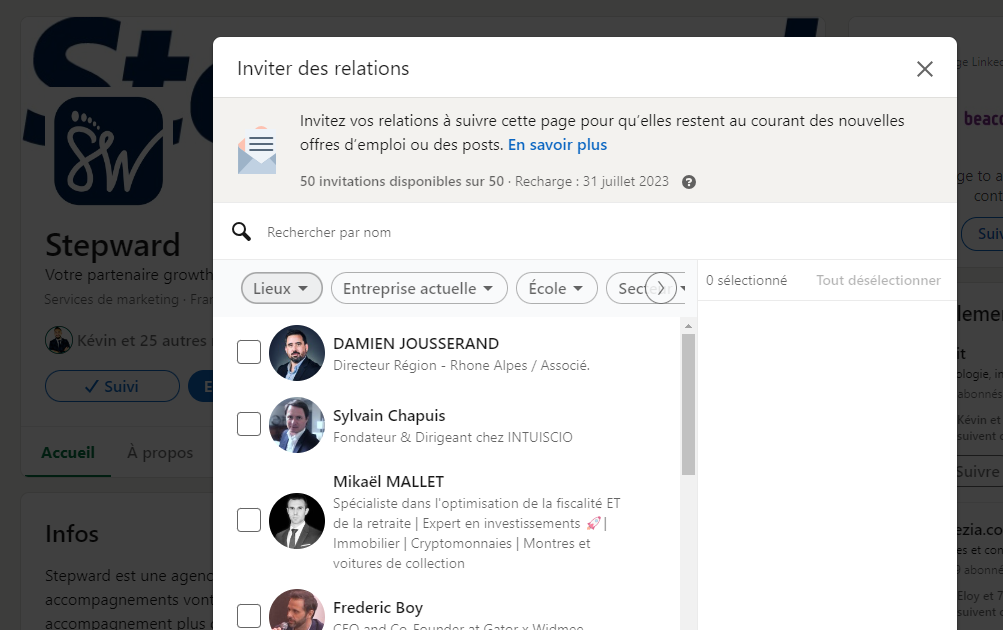
Even if a LinkedIn account is not the administrator of a page, it also has credits. That is where the trick lies. Each LinkedIn account is entitled to 50 invitations per month (invitations, not credits). The nuance is that these invitations are not returned when the person accepts your invitation.
Here is how it works:
- Go to the relevant company page.
- Click on “More”.
- Select “Invite connections”.
- Filter and invite the matching contacts.
“Thanks Fred, but it might take a while at this rate!”
Yes, I understand, and that is where MirrorProfiles comes in.
MirrorProfiles rents dedicated LinkedIn accounts: professional prospecting accounts, manually warmed up over 4 months, with more than 500 real connections, customizable and ready for automation. Compatible with any secure B2B outreach tool (native integrations with GetSales, HeyReach, SalesForge and Waalaxy), these accounts let you:
- Multiply your weekly prospecting volume: each account can send 100 to 120 connection requests per week, so 5 accounts represent 500 to 600 requests a week, and 10 accounts 1,000 to 1,200.
- Keep your leads in accounts rented by your company: the network and the conversations stay in-house, even when a teammate leaves.
- Leave your own LinkedIn account, and your colleagues’, out of prospecting.
You run your own tools and campaigns; MirrorProfiles provides the accounts and one platform to manage every account.
Back to our company page. Each of these accounts also has its 50 monthly invitations to follow a page, and its own network to invite. With ten accounts, that is 500 additional invitations per month; at the acceptance rate mentioned above, that is roughly 150 new followers a month for your company page. Renting accounts gives you a real head start in building the audience and engagement of your LinkedIn company page.
What’s more, if you have MirrorProfiles accounts, it is essential to couple them with an effective prospecting strategy.
It is essential to take a combined approach to increase the number of followers of your company page on LinkedIn. This includes inviting your network to follow your page, as well as understanding LinkedIn’s invitation limits. To build a strong company page faster, you can rely on services such as MirrorProfiles to multiply the number of accounts inviting their network, and therefore your reach.
By anticipating the coming changes on LinkedIn, you make sure you stay competitive and maximize the visibility of your company page. With a well-thought-out strategy and the right tools at your disposal, your LinkedIn company page can become a powerful promotional and development tool for your business.
FAQ
What are the advantages of sharing videos on my company’s LinkedIn page?
The benefits of sharing videos on your company’s LinkedIn page include increasing visibility, building brand awareness and credibility, demonstrating your expertise, and increasing user engagement. Videos generate more shares and conversations, create emotional connections, and can present your products in an attractive way. They also humanize your brand and involve your employees in content delivery.
How to use LinkedIn stories to increase the number of followers?
To increase followers on LinkedIn using stories, publish engaging, relevant content, such as updates on your achievements, customer testimonials, or company events. Use text, stickers and videos to make your stories dynamic. Share recent news and regular updates on upcoming events, such as webinars, to maintain engagement and show your company’s momentum. This will help attract and hold the attention of your audience, increasing your visibility and the number of your followers.
What impact does publishing case studies have on the growth of LinkedIn followers?
Publishing case studies on LinkedIn can significantly boost follower growth. This informative, shareable content encourages interactions, shares and comments, increasing engagement and attracting new followers. Studies have shown that long, structured content such as case studies performs particularly well, generating more views and shares.
How can targeted mailing campaigns help increase LinkedIn page followers?
Targeted mailing campaigns can help increase LinkedIn page followers through several strategies. First, by segmenting and personalizing emails based on recipients’ location, age, interests and industry, you can increase engagement. You can include links to your LinkedIn page in emails and encourage recipients to follow you using clear calls to action (CTAs). In addition, sharing valuable content and industry news in newsletters can encourage readers to follow you on LinkedIn. Finally, by using personalized CTA buttons to redirect prospects to a sign-up landing page, you can convert leads into followers.











