



Introduction
Growth Hiring is an innovation in the recruitment sector. These new techniques for recruiting quickly and well are going to change this environment significantly. Growth Hiring consists in combining various outbound prospecting actions based on data. If you’re already familiar with lead generation automation, you’ll quickly understand the value of growth techniques in recruitment.
Job boards are no longer effective, Michael Page-type firms are exorbitantly expensive and co-optation is often inadequate. That’s why in this article you’ll see the 3 pillars of any self-respecting Growth Hiring approach.
Growth Hiring will enable you to build a candidate pool quickly and efficiently. It works like a CRM, enabling you to plan your recruitment over the short, medium and long term.
Collecting and enriching your candidate files
What would Growth be without data? Not Growth at all. To get data on potential candidates, you’ll need to learn how to collect it at scale: this is known as scraping, a technique that automates copy-and-paste.
Unfortunately for Viadeo, LinkedIn has long held the monopoly, and 90% of candidate databases come from Recruiter Lite. Behind this hyperlink is a complete Recruiter Lite tutorial, yes, it’s a gift!
Once you’ve got your nice Recruiter Lite or Sales Navigator search set up, I’m not going to ask you to go through the profiles one by one: that’s not our style.
We’re going to collect these profiles, i.e. export them all at once into a Google Sheet. We’ll even go one better: we’ll enrich them with all the information their LinkedIn account contains, so as to prime the candidate pool and, above all, rate candidates before contacting them. I’ll explain it all later.
There are several tools available for collecting and enriching: PhantomBuster and Captain Data, among others.
For our part, we use Captain Data for its API stability and, above all, for its ability to chain collection steps. A workflow that allows us to both collect and enrich our Recruiter Lite search.
- Use this Captain: “Search LinkedIn Recruiter Lite”.
- In the same workflow, add this step: “Visit LinkedIn Profile”.
- Then use the “Aggregate” function.
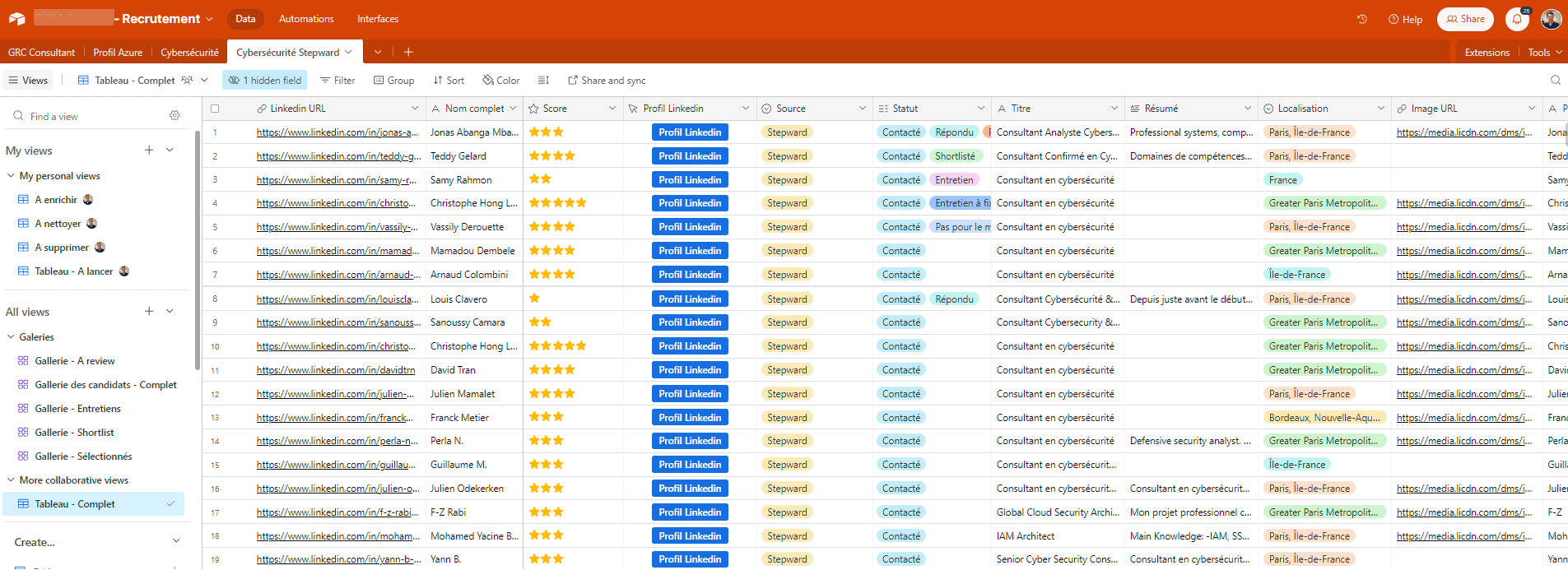
We’ve set up an n8n workflow and a Slack command to avoid human gymnastics, but concretely you arrive at this end result: a Product Marketing profile database.
Please note that LinkedIn limits each account, and this matters in this workflow: a profile can only visit a limited number of other profiles per day, between 30 and 50 for a free LinkedIn account and between 80 and 100 for a paid one.
To protect your accounts, we divide the first stage into batches of 50 LinkedIn profiles, each batch being handled by a single LinkedIn account. Keep this collection step separate from the accounts you’ll use to contact candidates: those come later, and that’s where volume really matters.
As you can see, we get a lot of information from the profile visit that will allow us to do 3 things:
-
Personalize copywriting, approach messages and follow-ups
-
Score candidates before making contact
-
Build up a pool of candidates. For example, on average, a sales rep spends 2 years with a company before moving on to see if the grass is greener elsewhere. So with this statistic, you know that as soon as a “Sales” in your pool reaches 2 years of seniority in the company, a little message is in order 😉
You’ve now got a great candidate database that will form the basis of your candidate pool. For our part, we chose to store the data on Airtable, which enabled us to create a customized ATS. But this step is more of a choice than a must-have, so select the ATS that best suits your needs.
Once you’ve compiled your list of potential candidates and drafted your approach messages, all that’s left is to go on the attack and contact them. Here again, we automate all low value-added tasks to free up time for longer exchanges with the candidates who reply to you.
Automated contact
Here you are at the heart of the Growth Hiring machine. LinkedIn URLs and emails are the fuel of your automation tools. Message content, or more generally copywriting, will enable you to automate contact and follow-up.
When it comes to candidate hunting or talent acquisition, here are my quick pros and cons on the top automation tools:
💚 Pros:
The cross-channel tool par excellence, this robust tool makes it easy to manage several LinkedIn accounts and mailboxes for your “candidate hunt”. If recruitment is a core business for you, and not just a one-off need, make this your preferred tool. For our part, LGM is the tool we use on most of our assignments.
They’re the only ones to offer LinkedIn voice messages. As far as I’m concerned, I haven’t seen an increase in the response rate, but that’s probably because I’m doing it wrong. Maybe you’ll do better than I did.
💔 Cons:
A complex tool to learn. If this is the first time you’ve set foot in an automation tool, it can easily lose you, so I wouldn’t recommend it as a first step. They make a big effort to make it easy to understand, and the support service is top-notch, so if you want to get started straight away with this tool, it’s possible. Keep in mind that workflows are nothing more or less than probability trees: “If” / “Then”. A final negative point is the lack of emailing functionality, unlike Lemlist.
💚 Pros:
A mailing tool at heart that is increasingly cross-channel. Lemlist releases new, highly competitive features. We’re tempted to switch to Lemlist, as they’re putting a lot of effort into LinkedIn features. The interface is ergonomic and intuitive. If your “candidate hunt” relies essentially on mailing, this is the tool you need. A very good tool that I’d put a little below LGM, more out of habit than out of any real objective analysis.
💔 Cons:
English-language support and a tool that’s increasingly internationalized towards the US, so be careful about your ability to understand support and FAQs. It may sound silly, but when we encounter a big problem and there’s an emergency, it can be very disabling. A very marketing-centric tool, which may have its advantages, but it can quickly make you lose sight of your objective: the human element. Don’t try to use every feature, no matter how cool it may seem. Often the simplest is the most effective.
💚 Pros:
A basic LinkedIn automation tool. It also tries to do some mailing, but it doesn’t really work. It’s the perfect tool for those new to automation tools. Simple and intuitive, workflows are template-driven. Support is very responsive and competent.
💔 Cons:
Weaknesses in emailing. In my opinion, Waalaxy should only be used if your candidate prospecting relies on LinkedIn loops alone. Its main weakness lies in the reliability of its technology: you need to check regularly whether your campaigns are still running. It’s a Chrome extension; they’ve released a Cloud version that works, but requires you to reconnect to Waalaxy at least once a month.
HeyReach:
💚 Pros:
The LinkedIn automation tool par excellence. They have one “unfair advantage” over the others: automatic LinkedIn account rotation. Coupled with MirrorProfiles, it’s literally impressive. If you select a database of 300 candidates, you can launch 5 LinkedIn accounts in just a few clicks, whereas other tools will require you to split your database into 5 smaller ones. Another feature I use is “Like a post”: your LinkedIn account will like the latest post published by your candidate, which is very interesting before you contact them, as it shows your interest (more than a profile visit).
HeyReach is also one of MirrorProfiles’ native integrations, and adding your accounts to it is included (pricing is on our pricing page).
💔 Cons:
A recent tool that occasionally falls victim to its own success, with slow campaigns. Quickly corrected by their responsive English-speaking support team, experts in LinkedIn prospecting. Key control functions are missing, but are included in the roadmap. It’s clearly a tool to keep an eye on.
In conclusion, our two darlings are LGM and HeyReach. Nevertheless, we mustn’t forget that LinkedIn limits each account when we use automation. The basis of our campaigns is the connection request, and each LinkedIn account can send around 100 to 120 per week. No automation tool changes what a single account can do, so the only way to scale is to work with several LinkedIn accounts, each staying within its own limits.
So if you have 1 license of a tool attached to 1 LinkedIn account, you’ll be able to contact 100 to 120 candidates a week.
On average, to get 3 candidates who have completed all the recruitment stages and between whom you need to make a choice, you need to contact around 600 people. That’s 5 to 6 weeks just to contact everyone, not counting the rest of your process.
That’s why an automation tool coupled with MirrorProfiles can be invaluable in speeding up your recruitment. MirrorProfiles rents dedicated LinkedIn accounts, manually warmed up over 4 months with more than 500 real connections, ready for automation. If you want to go fast, rent 2 MirrorProfiles accounts and use them alongside your own: that’s 3 accounts working your list, around 300 to 360 connection requests per week, and the same list covered three times faster.
Here’s a small example with HeyReach, for a “Sales” position in an SME in the “Energy” sector. The particularity was that there weren’t many hard skills expected, but rather a good fit with the Sales Director. Here, the complexity lay in handling the volume.
- Creation of a database of around 2,000 potential candidates.
- Setting up 10 MirrorProfiles accounts with HeyReach. These 2,000 candidates were contacted within 2 weeks.
- In the copywriting sequence we integrated a VideoAsk to asynchronously qualify interested candidates.
- Saved reply templates to handle responses faster: on average, 80 messages processed per day.
- Out of 2,000 people contacted, we received 600 replies, 58 of which took the VideoAsk test.
- The recruiter shortlisted 10 candidates out of these 58.
- The Director liked 8 of them and ultimately recruited 2.
Time between launch of the assignment and job offer: 4 weeks.
In short, it was fast and efficient. Unless we’d already had a pool of candidates, we wouldn’t have been able to move as quickly without HeyReach.
One of the great advantages of using automation tools (rather than doing it by hand) is that most of them are equipped with APIs. You can use webhooks to automatically synchronize your ATS. This is where the word “pool” comes into its own. Before your first contact actions, your recruitment pipeline was no more and no less than a database. Now, you’ll get qualitative information such as “Answered”, “Interested”, “Contact me again later”, and so on.
With these first 2 parts, you already have a Growth Hiring process that makes sense. However, the real lever lies in the verticalization of LinkedIn accounts. This is where you’ll see your results soar. This is what enabled me to carry out around a hundred recruitments on my own in less than a year and a half.
Verticalizing LinkedIn accounts
Let’s get back to our candidate pool! One way of recruiting quickly and effectively is to maintain a real recruitment pool. The heart of a good candidate pool is to continually talk to and inform candidates about the company’s activities. The aim is twofold: either they think of us when they want to change company, or when we contact them again for another job, they accept the exchange.
Here, the time saved by your recruiter thanks to Growth Recruitment will be the “unfair advantage” over your competitors who don’t use these techniques. In fact, the vast majority of companies don’t have the human resources (simply not enough recruiters) to manage a talent pool efficiently. If you divide the time spent by your recruiter on talent acquisition by a factor of 4 to 5, they will spend that much more time managing your candidate pool. And that’s not counting the growth techniques we’ll be looking at to manage a pool.
The perfect way to maintain a candidate pool after your contact campaigns is to verticalize your MirrorProfiles accounts.
Verticalization means dedicating 1 LinkedIn account to 1 type of candidate. For example, your recruitment schedule and experience will tell you that you have a recurring need for 3 types of profile: Sales, Marketing and Technical.
- Account 1, let’s call him Michel: Michel will be in charge of recruiting the Sales profiles.
- Account 2: Marketing profiles.
- Account 3: Technical profiles.
What’s in it for you? As you can imagine, a lot!
a) Engagement rate:
One of the advantages of verticalizing your accounts is that each of them can publish LinkedIn posts focused on its specialty: more on Sales for Michel, more on Marketing for account 2, and so on. You get the idea. But why? LinkedIn’s algorithm calculates an engagement rate for each of your LinkedIn posts. If this is above 30%, LinkedIn will push your content to your network, but also to people who are similar to your network. The equation is simple: engagement rate = number of likes + comments + shares / number of connections. It’s this famous division (sorry for those who don’t like maths) that explains this verticalization. In short, the more specific, and therefore smaller, your network, the higher your engagement rate.
b) Newsletter:
Yes, you read that right: your LinkedIn network will function as a newsletter in your Growth Recruitment system. You’ll be connected (1st-level network) to your potential candidates, so it’ll be easy to send them a LinkedIn message, without having to go through the “connection request” stage. It’s important to keep your candidates’ memory of you alive, even those who weren’t interested. As long as you share useful information with them, of course! For example, a monthly message to keep them up to date with news in their sector, or with the new Sales/Marketing tools that are in vogue at the moment, will be greatly appreciated and will lend credibility to your expertise.
c) Travel, trade shows, events:
The advantage of your super pre-ATS on Airtable is that it’s packed with information, including your candidates’ location. If you’re traveling to a trade show or other event, don’t hesitate to check your ATS to see which candidates you might meet. Whether it’s a coffee, a meal or an invitation to an event, this will strengthen the human bond, and sooner or later it will pay off.
A final important point that is too often underestimated: securing the pool.
Indeed, when you decide to set up a Growth Recruitment system, the first cornerstone of this system is a LinkedIn account. If you don’t use MirrorProfiles, you’re capitalizing on, and concentrating your pool in, an account that doesn’t belong to the company but to your recruiters. Although I wouldn’t wish it on you, one day your recruiter will leave your company and you’ll lose all the work you’ve done. Not all of it, fortunately, as you have your own pre-ATS, but the entire verticalization strategy. With a MirrorProfiles account, rented by the company, the network and the conversations stay with the company when a recruiter leaves. That’s why our clients (founder profiles aside) build their Growth Recruitment strategy on MirrorProfiles accounts rather than on personal profiles.
Each dedicated account can be customized (sector, positioning, photo, headline) within our usage rules, so that it matches the type of candidate it addresses. You can read more about what a MirrorProfiles account is.
Conclusion
Growth Hiring will enable you to build, nurture and secure your candidate pool. Before these techniques, a good candidate pool took up an enormous amount of human time and therefore required a lot of recruiters. From now on, it’s no longer reserved for large companies.
The only thing that can’t be automated is updating these pools, as they contain qualitative, human data that only you or your recruiters can enter. To make reporting easier, the tag and webhook systems of your automation tool and your ATS will let you automate part of it. As you can see, our mission is to do away with copy-and-paste and refocus recruiters on what they do best: taking an interest in people!











