



Introduction
LinkedIn InMails: the feature LinkedIn came up with as an alternative to email. First of all, if you don’t have a premium subscription, don’t look for them, you don’t have any. This feature is only available to paying users. The aim of this article is to explain what a LinkedIn InMail is, and how and when InMails can be useful.
What is a LinkedIn InMail?
InMails on LinkedIn, distinct from regular messages, are a communication tool reserved for users with premium accounts. These special messages let you contact LinkedIn members who aren’t in your direct network, without needing their email or phone number, which is particularly useful for recruiters looking to reach potential candidates.
Unlike conventional messages, which are limited to first-degree connections, InMails let you reach second- and third-degree contacts without a prior connection request. This gives you greater reach and makes it easier to contact prospects or professionals outside your immediate network.
InMails are a paid LinkedIn feature, available through the various premium subscriptions. Each subscription comes with a specific number of InMail credits per month, from 5 to 150 depending on the plan. These credits are used to send InMails.
Beyond their extended reach, InMails have higher open and response rates than traditional emails, making them particularly effective for lead generation and prospecting. They can also be automated with specialized tools, so you can send them in volume without writing each one individually.
As we’ve just seen, InMails are very limited per paying user, so it’s important to think about when it makes more sense to use an InMail rather than a classic connection request.
How and why use InMails?
InMails on LinkedIn are particularly useful for contacting people outside your direct network. The tool offers several advantages:
- Extended accessibility: InMails let you contact people even if you don’t have their email address or phone number. This comes in handy when you only have the first and last name of the person you want to reach, giving you direct access via their LinkedIn profile.
- Messages to all members: with a premium account, you can send messages to any LinkedIn member, regardless of their account type. This considerably extends your reach on the platform.
- Personalization: InMails can be personalized, which is crucial for adapting your communication to the recipient’s preferences or for presenting your company’s needs effectively.
- Templates and statistics: LinkedIn offers templates to make writing InMails easier and faster. The platform also provides statistics to track the effectiveness of your messages, with feedback on recipient engagement.
In practice, we use InMails as a last resort, since it’s the lever with the fewest credits available. Here are our steps:
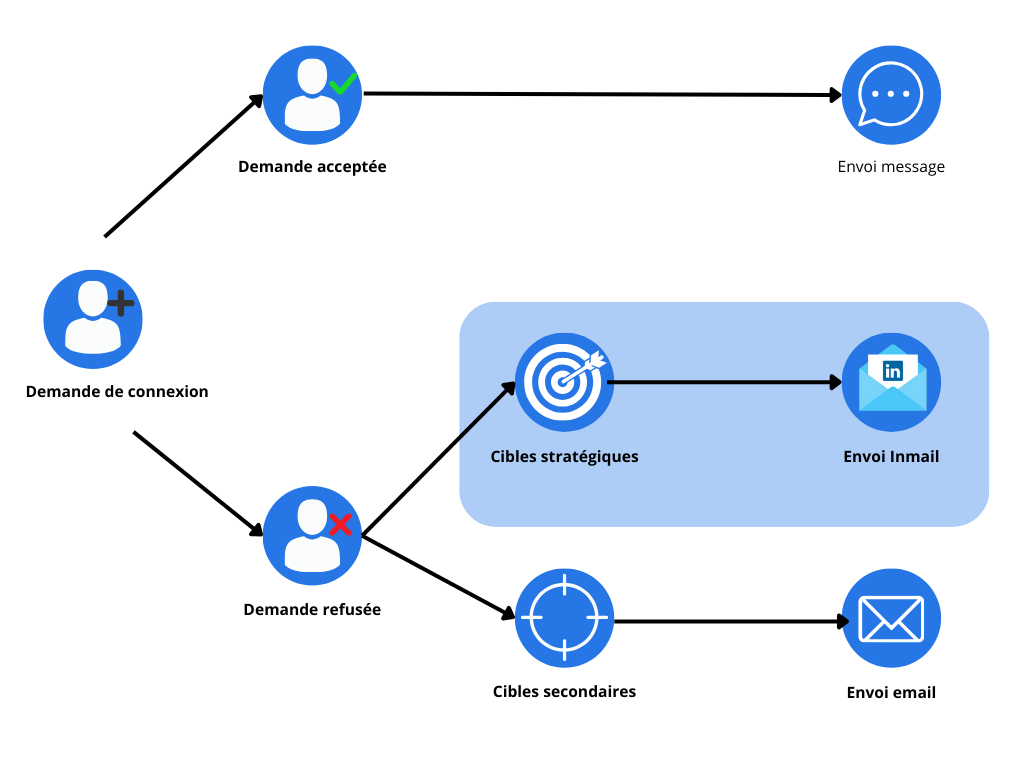
What makes InMails special comes down to 2 things:
- There’s no network limit. Whether the person is a 2nd- or 3rd-degree contact, you can send them a LinkedIn message via InMail.
- An InMail, like an email, has a title or subject line. That gives you more impact.
InMails are therefore another acquisition channel, underestimated by many companies. It’s a powerful feature, but it has several drawbacks.
Our advice on InMails
As we’ve seen, InMails can be a formidable weapon for surgical prospecting. However, the fact that the prospect doesn’t need to be in your network to reply is a real drawback. At first glance, you might think it’s no big deal. But you lose the whole point of how LinkedIn is built.
When a prospect joins your 1st-degree network, they see all your content, comments and likes on LinkedIn. It’s precisely this proximity that makes LinkedIn one of the channels of choice for both prospecting and recruitment. With MirrorProfiles, you can multiply your prospecting volume in proportion to the number of accounts you run, and with it the network reach of your LinkedIn accounts.
On top of the distance InMail creates, you get few InMails per subscription: 50 credits a month on a Sales Navigator subscription. That’s an expensive message! Especially if your prospect doesn’t reply.
The best strategy is still the connection request. Optimizing your acceptance rate is one thing, but you’ll never reach 100%. Take advantage of MirrorProfiles to send connection requests from several dedicated LinkedIn accounts, always re-targeting the prospects who didn’t accept the request from your previous account.
If after 3 or 4 different LinkedIn accounts, each with its own positioning, the person still hasn’t accepted you, it’s probably because they don’t use LinkedIn, so an InMail won’t help. On the other hand, you can make the most of that contact by reaching them by email.
Conclusion
InMails on LinkedIn are the platform’s answer to traditional email, offering a privileged means of communication for users with a premium subscription. The tool lets you contact people outside your immediate network without needing their personal contact details. Unlike traditional messages, InMails give access to a wider range of contacts, with higher open and response rates, making them particularly effective for prospecting and lead generation.
However, InMails have their limits. Access is reserved for premium accounts, with a limited number of credits per month. So it’s essential to use them wisely. A recommended strategy is to prioritize conventional connection requests before resorting to InMails, optimizing the chances of those requests being accepted. This strategy, made possible by MirrorProfiles, lets you increase your reply rates while preserving LinkedIn’s primary asset: the network.
This approach helps maintain interest and engagement on LinkedIn, while making the most of your limited InMail credits. In short, although powerful, InMails should be used with discretion as part of a wider communication and prospecting strategy on LinkedIn.











