



Introduction
Creating a LinkedIn poll can transform the way you interact with your network. It is a direct, effective way to sound out opinions, generate engagement and gather valuable information that can guide your prospecting efforts. But how do you design a LinkedIn poll that really grabs attention and prompts action? This complete guide shows you how to make the most of this feature, with practical tips and real-life examples. For more tips, check out our full article on the different techniques for doing ABM on LinkedIn.
What is a LinkedIn poll and why run one?
A poll is a data collection tool that lets you ask your audience a specific question and collect their answers from a set of predefined choices. On LinkedIn, launching a poll is not just a way to gather opinions: it is a strategy for energizing your page, boosting your visibility, and engaging and generating leads on LinkedIn.
Using polls on LinkedIn offers many benefits for increasing engagement and understanding your audience in greater depth. It is also a good way to collect data that is not visible anywhere online, so you can personalize your prospecting later on. For example, always frame the question around how people feel: “Are your sales reps able to prospect effectively on LinkedIn?” If a Sales Director answers “No”, you have a clear opening to offer your services or to promote MirrorProfiles 😉
Polls encourage direct interaction with your audience: instead of simply reading your content, users actively take part by expressing their opinion through a vote. This type of interaction can significantly boost engagement on your posts.
What’s more, LinkedIn polls provide invaluable real-time feedback. Whether you are about to launch a new service or are weighing several strategic options for a project, asking your audience a direct question can help you make better-informed decisions, based on your target audience’s real preferences.
In addition, a well-designed LinkedIn poll that is relevant to your audience can increase the visibility of your profile or company page. Polls encourage people to comment and share, which expands your reach and may attract new followers or connections interested in the topic.
Finally, analyzing the results of a poll helps you better understand the trends, preferences and behaviors of your LinkedIn community. These insights are extremely useful for refining your future content, marketing or even product development tactics, based on concrete information rather than guesswork.
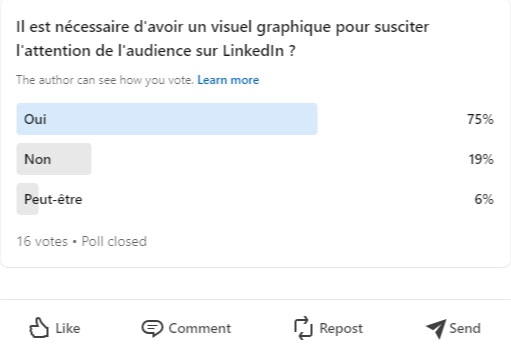
Take the example of an IT startup planning to launch a new product. Before finalizing the features, it could create a poll asking its audience which feature they find most useful or innovative. Not only does this help the startup better understand the expectations of its target market, it also engages the community by involving them in the process of developing the offer. What’s more, some of the people who answer your poll will be the first to be interested in your future offer, so it is a great way to acquire your early adopters.
By integrating polls into your LinkedIn tactics, you are not just asking questions; you are building bridges, stimulating interaction and valuing the opinions of participants. It is a powerful way of showing that you value not only their feedback but also their involvement in the development of your brand or company.
How do I create a poll on LinkedIn?
Creating a poll on LinkedIn is a simple yet strategic step that can boost your network’s engagement. Here is a step-by-step guide to setting up a poll on the platform.
Here are the steps:
- Start a new post: – Log in to your LinkedIn account or to your dedicated MirrorProfiles account. – In your news feed, click on “Start a post” or use the “Start a post” box at the top of your home page.
- Select the poll option: – In the post options menu, click on the poll symbol, often shown as a bar chart icon or a button labeled “Poll”.
- Write your poll question: – Type your question in the space provided. Make sure the question is clear, concise and invites a clear-cut decision or opinion.
- Add answers: – You can offer up to four answer choices. Be precise and direct in your wording so that the options are easy for voters to evaluate and choose.
- Set the poll duration: – LinkedIn lets you choose how long your poll stays active. Options range from 24 hours to two weeks. Select the duration that best suits your need for answers.
- Targeting and publishing: – Before publishing, you can choose who can see your poll. You can make it public, restrict it to your connections, or share it with specific groups if you are a member. – Once everything is set up, click on “Post” to launch your poll.
Maximize the impact of your poll
To maximize the impact of your LinkedIn polls, there are several key elements to consider. First of all, the clarity and relevance of the question are essential. A well-worded question directly related to your target’s interests is more likely to generate active participation and shares. Every type of interaction on your LinkedIn poll increases its visibility. It is crucial to make sure the question engages your audience and provokes thought or debate. This is also where verticalizing your LinkedIn accounts makes complete sense.
Secondly, managing the response window plays an important role. Choosing the right duration for your poll is a delicate balance between giving users enough time to respond and maintaining a sense of urgency that encourages quick participation. A poll that runs too long may lose attention, while one that is too short may not leave enough time to reach a large audience.
Finally, analyzing the results is a crucial step once the poll is over. LinkedIn offers tools for summarizing and analyzing responses, providing valuable data on the prevailing opinions and trends within your network. These elements are essential for refining your future methods, whether in content, marketing or product development.
By incorporating these tips when creating your polls, you can not only boost engagement on LinkedIn but also gain relevant insights that will help you better understand and serve your target audience.
Gain visibility with MirrorProfiles accounts
Using MirrorProfiles accounts can considerably increase your visibility on LinkedIn. These are dedicated accounts, manually warmed up over 4 months with more than 500 real connections, that you run with your own tools to target and engage different segments of your audience more effectively.
When you have several MirrorProfiles accounts, you multiply the opportunities to reach your audience. Each account can focus on a specific niche or aspect of your industry, allowing you to cover more ground without saturating your core audience.
Imagine you run a company specializing in digital solutions for education. You could have one main account for general company announcements and several MirrorProfiles accounts:
- one to talk about innovations in early learning.
- another for secondary education.
- and a third targeting higher education.
Each account can launch polls specific to its interests, generating more targeted and relevant discussions.
With several accounts, you can also increase the frequency of your posts without appearing repetitive. More posts and polls mean more engagement, which strengthens your presence on the platform. LinkedIn’s algorithms favor active profiles, which can increase your overall visibility.
The interactions and data collected across different MirrorProfiles accounts provide valuable insights into the needs and preferences of diverse segments of your market. This understanding can lead to more suitable products or services, open up conversations with prospects and establish your reputation as a thought leader in several fields.
By diversifying your accounts, you have the freedom to experiment with different content techniques, tones and approaches without compromising your core brand identity. This can include bolder or more experimental approaches to see what resonates best with different groups.
In short, by using MirrorProfiles accounts on LinkedIn, you can extend your reach, refine your marketing tactics and increase engagement. Each account can act as a satellite, exploring and interacting with a specific part of your audience, while contributing to the overall goal of your presence on the platform. This not only lets you reach more people, it also creates targeted, effective business opportunities.
In conclusion, creating a LinkedIn poll is much more than just collecting opinions: it is a dynamic tactic for establishing an authentic dialogue with your network, and therefore with potential prospects. Every poll you launch is a valuable opportunity to gain an in-depth understanding of your audience’s concerns, needs and preferences, while giving their opinions a role in the development of your brand or company.
Through thoughtful, relevant questions, you invite your audience to interact directly with your content, which not only enriches the user experience but also boosts your visibility and relevance on LinkedIn. What’s more, analyzing the results can provide invaluable insights, helping you refine your future methods and make better-informed decisions.
In short, LinkedIn polls are not just a measurement tool but a real bridge between you and your professional network, enabling you to build solid, lasting relationships. By making the most of this feature, you can open the door to new business opportunities and collaborations. Adopt this approach to transform the way you interact with your network, adding consistent, measurable value to your digital presence.











