



Introduction
You’ve spent years building your network on LinkedIn, refining your profile, making valuable connections and using the platform to prospect and grow your business. Then, one fine day, without warning or knowing how, you discover that your account has been restricted, or worse, closed for good.
The cause of a restricted account? A prospecting campaign that’s a little too enthusiastic, perceived by LinkedIn as spam, or many other things. Suddenly, your means of communication, your leads and your professional online presence are in jeopardy.
This situation, far from being hypothetical, is a real headache for many professionals who depend on LinkedIn for their prospecting and networking activities. Faced with this reality, it becomes essential to understand not only the reasons why LinkedIn imposes such restrictions, but also how to remove a LinkedIn account restriction, and how to set up alternatives that allow you to continue your prospecting activities without risking your main account.
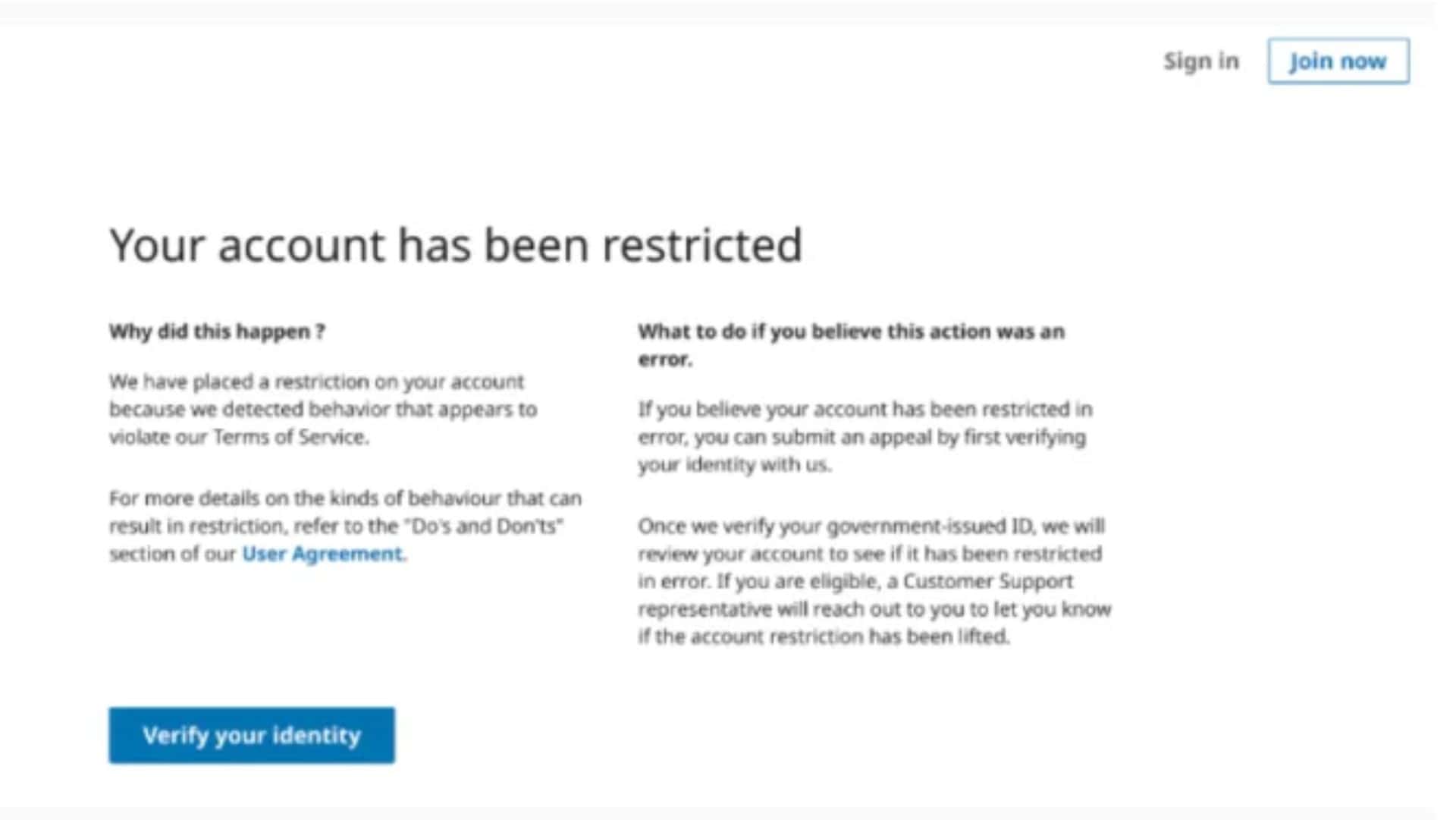
Restrictions on LinkedIn
A. Why are accounts restricted?
LinkedIn applies a restriction to an account for various reasons, mainly to maintain a professional and secure environment on its platform. These restrictions may be the result of activities that LinkedIn considers inappropriate on its platform, such as:
- Spamming: The sending of unsolicited bulk messages, invitations or promotional content may be considered spam and subject to restriction. To stay clear of this, avoid all external Internet links directly in your automated prospecting messages.
- Abusive behavior: Any behavior deemed abusive, harassing or discriminatory towards other users may lead to account restriction.
- Excessive automation: The use of automation software or tools to perform actions on LinkedIn (such as sending invitations or publishing content) may be detected as abusive and result in sanctions. To avoid this, aim for a minimum acceptance rate of 20% on your connection requests and a response rate of 15% on your messages.
- Excessive connection frequency: Unusual activity, such as too many connection requests in a short space of time, can trigger security alerts and result in temporary restriction. Keep your volumes steady from one week to the next rather than sending in bursts.
B. Types of restrictions and their impact
Restrictions on LinkedIn may vary depending on the severity and type of offense. There are several types:
- Temporary restriction: This is the lightest form of restriction, often imposed for minor offences or suspicious activities. Access to certain functions, such as sending invitations or publishing messages, may be temporarily put on hold.
- Full account restriction: For more serious offenses, LinkedIn may lock the account entirely, preventing the user from logging in and accessing their profile. This may be reversible after review by LinkedIn support.
- Permanent closure: In extreme cases, LinkedIn may choose to permanently close an account. This usually occurs after repeated or particularly serious breaches.
The impact of these restrictions goes beyond the immediate inconvenience. They can damage professional reputation, limit networking opportunities and negatively affect prospecting and business development efforts on the platform. So it’s crucial to understand how LinkedIn works and act responsibly to avoid such restrictions.
Steps to lift a LinkedIn restriction
Check the type of restriction applied
The first step is to understand the nature of the restriction imposed on your LinkedIn account, but how? In general, LinkedIn notifies users by email or via notifications on the platform when a restriction is applied, specifying the reason. Check your inbox and the help or security sections of your account for details of the type of restriction and the reasons for it.
Contact LinkedIn support
Once you’ve understood the reason for the restriction, the next step is to contact LinkedIn customer support to request a review of your case. You can do this by using the contact form available on the LinkedIn website, selecting the most relevant option related to your problem. It is important to provide a clear and concise explanation of your situation and to ask for specific instructions on how to lift the restriction.
Provide the necessary information or documents
Depending on the nature of the restriction, LinkedIn may request additional information or documentation to verify your identity, validate your professional activity, or prove that you have corrected the behavior that led to the restriction. This could include identification, information about your company or an explanation of your activities on LinkedIn. Be sure to provide all requested documents in a clear and professional manner to facilitate the review process.
Wait for the account review
Once you’ve submitted your request and provided the necessary information, it’s essential to wait patiently for LinkedIn to review your case. Response times may vary depending on the volume of requests received by support and the complexity of your situation. In the meantime, avoid creating a new account or performing actions that could be interpreted as an attempt to evade the restriction, as this could worsen your situation.
It is important to note that each case is unique, and there is no guarantee that the restriction will be lifted. However, by following these steps methodically and cooperating fully with LinkedIn’s requests, you increase your chances of having the restriction on your account lifted.
The alternative: MirrorProfiles for prospecting without risking your main account
For professionals who depend on LinkedIn for lead generation and business development, there is a simpler way to keep your personal account out of the equation. MirrorProfiles provides dedicated professional LinkedIn accounts, prepared and manually warmed up over 4 months with more than 500 real connections, ready for automation: you run your own tools and campaigns, MirrorProfiles provides the accounts and one platform to manage them.
Each account comes with a complete profile (headline, bio, experience, education) and an AI-generated photo, so that no third party’s likeness is ever used, and can be customized to your industry and positioning. The rental has no commitment, with monthly billing. Our usage rules keep every account within a responsible behaviour on LinkedIn, which is exactly what keeps an account healthy over time.
When needed, an account is replaced in under 48 hours: our customers simply notify the support team, and a new account is set up so that prospecting resumes with minimal disruption.
Advantages of MirrorProfiles accounts
- Multiply your prospecting
One of the main advantages of MirrorProfiles accounts is their ability to multiply your prospecting efforts. By using several dedicated accounts, you can target different market segments, test different communication approaches and increase your reach in proportion to the number of accounts, without involving your personal LinkedIn account. LinkedIn limits what each account can do (100 to 120 connection requests per week and 40 messages per day per account, and no profile visits), so with 10 accounts you are looking at 1,000 to 1,200 requests per week. This strategy helps optimize prospecting campaigns and achieve more ambitious sales targets.
- Protecting your personal account
By separating your prospecting from your personal LinkedIn account, you keep the network you have spent years building, and your own presence on LinkedIn, entirely out of your outbound campaigns. And because the accounts are rented by the company, the network and conversations they generate stay with the company when a teammate leaves.
- Account verticalization
Account verticalization is another distinctive feature of MirrorProfiles. This involves customizing your MirrorProfiles account (industry, positioning, photo, headline) within our usage rules. This specificity increases the effectiveness of interactions by ensuring that messages and offers are highly relevant to the target audience. As a result, response and conversion rates can improve significantly, making your prospecting efforts more fruitful.
Conclusion
Faced with the often brutal reality of restrictions on LinkedIn, professionals face a dilemma: how to continue prospecting effectively without jeopardizing years of work and effort invested in building their network and online presence? The answer lies in prudence and in separating the two: your personal account for your network, dedicated accounts for outbound.
MirrorProfiles offers that alternative: dedicated accounts, prepared for prospecting, that follow our usage rules and are replaced in under 48 hours when needed, so that professionals can run their campaigns with peace of mind.
It’s now possible to pursue dynamic and effective prospecting on LinkedIn, while protecting what you’ve already achieved and preparing for the future with confidence.











