



Choosing the right LinkedIn subscription is a crucial question that many professionals ask themselves, and rightly so. Every professional has specific needs, which means one type of subscription may suit them better than another. Each of the LinkedIn Premium plans offers particular features that can optimize your efforts, whether you’re recruiting or prospecting.
LinkedIn Premium plans for prospecting
At MirrorProfiles, we’ve noticed that the majority of our clients use our services mainly for prospecting. Here is an analysis of the LinkedIn subscriptions specifically suited to this purpose:
- Free LinkedIn account: This basic option lets you create a profile, connect with other professionals, receive messages, apply for jobs, join groups and view other users’ profiles.
- LinkedIn Premium Career ($39.99/month): This subscription is ideal for job seekers. It lets you see who has viewed your profile, send direct messages to people outside your network and see the job offers other candidates have applied to. However, it is not recommended for prospecting.
- LinkedIn Premium Business ($59.99/month): Aimed at professionals and companies, this subscription offers tools to grow your network and your business, such as company insights, online courses and the ability to contact people outside your network. However, it adds no advanced search filters, which makes it limited for targeted prospecting.
- LinkedIn Sales Navigator Professional ($99.99/month): An essential prospecting tool for salespeople. It provides lead recommendations, advanced search features, company information and the ability to contact people outside your network. Indispensable for effective prospecting.
- LinkedIn Sales Navigator Team ($149.99/month): On top of the Professional features, this version lets you work as a team with team reports, CRM synchronization and lead tracking tools for several users.
- LinkedIn Sales Navigator Enterprise (custom pricing): The most advanced version for large companies, it includes all the Team features, plus lead tracking for every user in the company, with no cap, and advanced functionality.
For quality prospecting, Sales Navigator is really a must. Premium Business brings few additional advantages. It is therefore wiser to invest in a more expensive, but better quality, subscription.
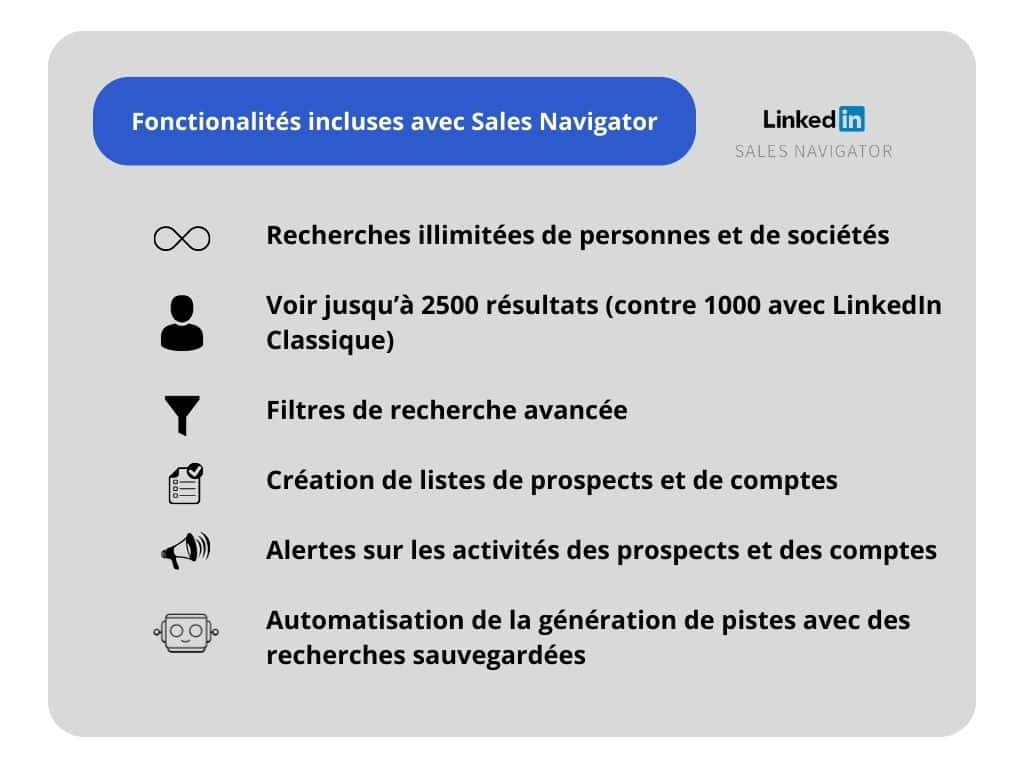
The main advantage of Sales Navigator is the increased number of available filters. Without this subscription, it is impossible to use advanced techniques such as double filtering.
The double filtering technique:
Double filtering is an advanced search technique made possible by the LinkedIn Sales Navigator subscription. It consists of using combined search filters to refine the results and target more precisely the prospects or accounts that best match your qualification criteria.
For example, you can first filter the results by industry and company size, then apply a second filter to select only the decision-makers within those companies. This gives you an extremely relevant and qualified list of prospects, optimizing your prospecting efforts.
Without the Sales Navigator subscription, LinkedIn does not let you apply several filters at the same time, which limits the precision of your search. For a better understanding of the technique, see this detailed article.
The importance of effective segmentation:
Effective segmentation is crucial to maximizing your prospecting and marketing efforts. This approach lets you target potential customers more precisely by grouping them according to various criteria such as industry, company size, geographical location and specific needs.
It helps you personalize messages and offers for each segment, increasing your chances of success. What’s more, effective segmentation saves time and resources by concentrating efforts on the most promising and profitable segments.
It’s also important to note that LinkedIn limits each account to around 100 to 120 invitations per week, and that invitations with a note are even more restricted on a free account. A LinkedIn Premium subscription gives you more flexibility on personalized notes, but doesn’t change what a single account can send.
With the Sales Navigator subscription, you get access to features such as CRM and ATS integration, which lets you optimize your workflow and improve collaboration with your sales or recruitment teams, essential for effective prospecting.
Finally, don’t underestimate the powerful impact of the Insight Tags and lead generation forms included in the Premium Business plan. These tools give you detailed information about your visitors and let you capture prospects directly from your LinkedIn page.
In short, choosing the right LinkedIn subscription is crucial to aligning your tools with your prospecting and marketing objectives. For advanced prospecting, Sales Navigator remains the best option, while Premium Business can greatly help improve engagement and the quality of your network.
Subscriptions for recruitment
Some of our clients use MirrorProfiles accounts mainly for recruitment. They aren’t necessarily looking for a large prospecting volume, but rather for a way to keep their talent pool safe. When a recruiter uses their own LinkedIn account, they build a specialized network based on the positions they have to fill.
With MirrorProfiles accounts, our clients can organize their networks by sector (one account for developers, one account for salespeople, etc.) and keep their talent pool within the company if a recruiter leaves.
The majority of our clients choose the Recruiter Lite subscription for several important reasons. Before detailing them, it’s crucial to understand that, when it comes to recruitment on LinkedIn, there are mainly two subscriptions to consider:
- The Premium Career subscription is often considered less suited to the needs of professional recruiters. Although it offers some useful features for job seekers, such as seeing who has viewed their profile or sending direct messages to people outside their network, it doesn’t provide the advanced tools needed for effective, targeted recruitment.
- Recruiter Lite, on the other hand, is specially designed for recruitment professionals. It offers a range of advanced features that let recruiters search for and interact with potential candidates in a more efficient and organized way.
LinkedIn Recruiter Lite ($2,399/year): Aimed at recruiters, this subscription offers tools to find and contact potential candidates, manage candidate relationships and post job offers. It lets you see the full profiles of candidates outside your network, send direct messages to potential candidates and manage your applications, which is essential for effective recruitment.
LinkedIn Recruiter (from $8,999/year): This is the most complete version for recruiters, with advanced tools for candidate search and management, team collaboration features and advanced analytics.
Here are some of the key Recruiter Lite features that make it particularly attractive to recruiters:
- Profile searches with no cap: This feature lets recruiters browse, with no volume restriction, the large number of profiles available on LinkedIn. It’s essential for identifying a wide range of potential candidates for recruitment.
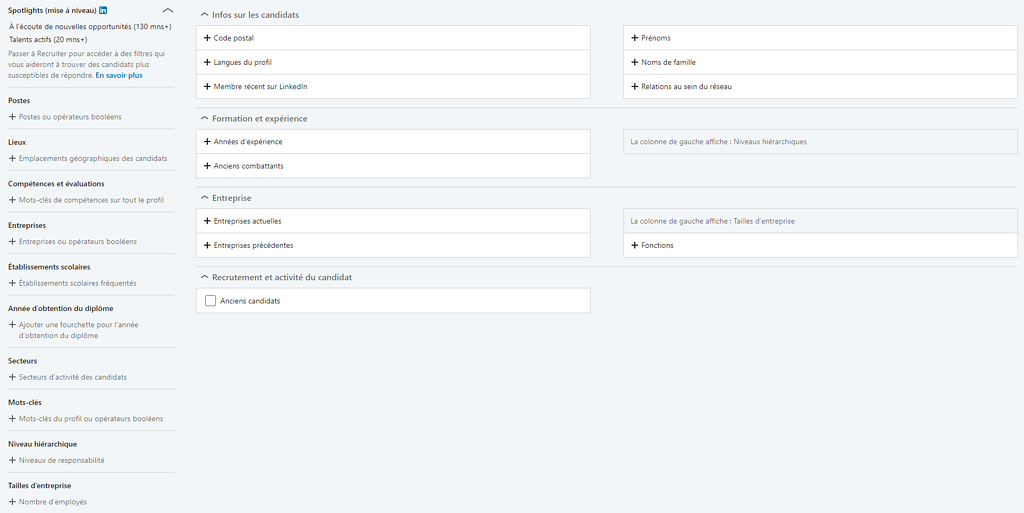
- Advanced search filters: Recruiter Lite offers filters specific to recruitment, letting recruiters refine their searches and target candidates who precisely match the criteria required for a given position.
- Candidate list creation: This function lets you create candidate lists, called “projects” by LinkedIn, making it easier to manage and track potential candidates throughout the recruitment process.
- Similar candidate search: This feature lets you find candidates with skills and experience similar to those already identified as interesting potential candidates for recruitment.
At first glance, it might seem wise to opt for Sales Navigator, but Recruiter Lite’s filters are far more relevant when you have a precise idea of the candidate profile you’re looking for.
These features, among others, make Recruiter Lite a preferred choice for many professional recruiters. In addition, the Recruiter Lite subscription is also less expensive than the full Recruiter subscription, which makes it more accessible for small and medium-sized companies or independent recruiters.
Here is the exhaustive list of Recruiter Lite filters:
One Recruiter Lite subscription, on a single account, is enough to build the candidate lists your other accounts then work. With 5 accounts, each staying within its limit of around 100 to 120 connection requests per week, you go from 100 to 500 or 600 invitations a week, i.e. five times more candidates added at a constant acceptance rate. Of course, this will depend mainly on your photo, your headline and, above all, on whether your profile is consistent with your target.
By diversifying your approaches, you maximize the chances of getting a positive response from your prospect. If your target isn’t receptive to a certain profile (young Business Developer), it may be receptive to another (Senior Sales Executive). The gender of the profile can also have an impact, as can the language spoken.
Choosing the right LinkedIn subscription is essential to optimizing your prospecting and recruitment efforts. For prospecting, Sales Navigator is clearly the most powerful option, thanks to its advanced search and automatic lead generation features. For recruitment, Recruiter Lite is the preferred choice of the majority of our clients, because it offers features specifically designed for recruiters, at a more affordable cost than the full Recruiter subscription.
Automation plays an increasingly important role in prospecting and recruitment. Technologies such as ChatGPT can help automate tasks like more precise targeting of candidates or prospects. In addition, prospecting automation tools, such as those offered by Stepward, can help keep your talent pool safe and automate part of the sourcing, which is crucial to optimizing recruitment and sales processes.
To go further in understanding and optimizing your prospecting and recruitment efforts, we recommend the following articles:
Ultimately, the choice of LinkedIn subscription depends on your specific needs and your budget. It’s advisable to look carefully at the features of each subscription and assess whether they match your needs before making a decision.
If you’re looking to automate part of your sourcing, most of our clients are supported by a leading agency in this field: Stepward.











