



Prospecting on LinkedIn has become commonplace. Expanding your network and running effective marketing campaigns requires more than just connections. Knowing how to find emails from LinkedIn, and more precisely professional email addresses, opens new doors for direct, personalized communication, essential to any digital marketing strategy. This article explores why retrieving emails via LinkedIn is crucial, presents the most effective tools for doing so, and discusses best practices for launching successful email campaigns.
Emailing, an acquisition channel not to be overlooked
Emailing is once again one of the most popular acquisition channels. In fact, long neglected in favor of LinkedIn, email campaign statistics are gradually picking up. Thanks to LinkedIn, you’ve been able to show your prospects that you’re interested in them, whether through a connection request, a like or a comment on their posts (to automate all this, I recommend HeyReach).
The previous actions you’ve taken will give your email campaigns a precise and effective hook. For example: “Profile X tried to contact you via LinkedIn”. Multiplying your prospecting accounts with MirrorProfiles will increase your prospect’s curiosity. It’s only human to wonder why so many different people are reaching out to us. In our experience, when more than 3 people have contacted you about the same thing, you’re around 65% more likely to accept the appointment proposed by the 4th person.
To improve the effectiveness of B2B email campaigns, it’s essential to pay particular attention to the wording of email subjects. A well-designed subject line should be concise and captivating to encourage the recipient to open the message. Here are a few tips to help you get there:
- Concise and clear: An email subject line should be straight to the point, with no superfluous content.
- Caution with vocabulary: Avoid terms that could trigger spam filters.
- Arousing emotions: Aim to touch the recipient by arousing curiosity or provoking an emotional response.
- Engaging formats: Open-ended questions, exclusive announcements, and urgent calls to action are formats that can increase engagement.
- Personalization: Adding personalized elements, such as the recipient’s name, can enhance interest in the message.
- Using current events: Using current events or statistics can make the subject more relevant.
- Simplicity: A subject must be kept simple and professional to be taken seriously.
- Experimentation and optimization: A/B tests are useful for determining the most effective approaches.
For follow-up or last-chance emails, it’s advisable to maintain a respectful approach and provide a new perspective or information that might rekindle the recipient’s interest. At the end of the day, a well thought-out email subject is a decisive factor in standing out in a competitive environment and increasing email open rates.
When it comes to the actual content of the emailing, it’s up to you! 😉 If you need help, we’ve compiled a list of tips and best practices for writing prospecting emails.
In addition to the qualitative aspect of a prospecting email, the quantitative aspect should not be overlooked. In fact, an email address optimized for deliverability can send up to 200 emails a day. What’s more, tools like Instantly and Lemlist let you multiply your domain names and sending addresses, so that your volume grows with the number of addresses.
Now that we’ve seen the benefits of email marketing for customer acquisition, you’re going to need some fuel: your prospects’ email addresses.
Why find emails from LinkedIn?
Collecting email addresses via LinkedIn is of strategic importance in digital marketing. This approach allows you to re-engage contacts who have not accepted your request to connect on LinkedIn. These individuals, inaccessible via the platform, can be effectively targeted by email campaigns, transforming an initial refusal into a communication opportunity.
When it comes to keeping in contact with prospects, it’s essential to understand that this goes beyond simply collecting information. It’s a way of enriching your CRM with qualitative data, the fruit of meticulous work on the database. By collecting email addresses, you can turn every interaction on LinkedIn into a lasting resource for your sales and marketing teams.
The retrieval of personal emails, after acceptance of an invitation and initial interaction, is technically possible. However, it is imperative to comply with regulations such as the GDPR, which prohibits the use of these personal emails for direct prospecting purposes. If you do, you’ll immediately be reported by unhappy prospects ^^.
However, these addresses can be invaluable to your marketing teams, in particular for creating lookalike audiences in retargeting campaigns, by reusing the filters you applied when building your list.
Finally, the use of solutions like MirrorProfiles can increase the acceptance rate of invitations on LinkedIn. By personalizing a dedicated account (sector, positioning, headline) to match your prospect’s world, you create a bond of trust and familiarity, increasing the chances of acceptance. This “peer-to-peer” method is a subtle tactic for expanding your network and improving the effectiveness of your prospecting campaigns.
Professional email enrichment tools
Collecting the data is a crucial step in any digital marketing strategy. Using the right tools is essential to gather the information efficiently while keeping your account healthy: LinkedIn limits what each account can do, and it’s worth knowing why a LinkedIn account can be restricted. With MirrorProfiles, your campaigns run on dedicated accounts, replaced in under 48 hours when needed.
Once the database has been built up, it’s time to enrich it with specific tools:
Dropcontact: This tool specializes in data verification and enrichment. It doesn’t just find email addresses; it cleans, dedupes and standardizes them, ensuring a high-quality database. Dropcontact’s main advantage lies in its powerful algorithm, which guarantees reliable, up-to-date data. Most relevant if your prospect is located in France.
Datagma: Datagma stands out for its artificial intelligence approach to data enrichment. This tool not only offers contact information, but also provides valuable insights into prospects, such as their activity on social networks or their online behavior, enabling further personalization of marketing campaigns. Relevant for prospects on the European continent.
Snov: Snov is a versatile tool for finding emails, checking their validity and launching email campaigns. Its ease of use and integration with other platforms make it a preferred choice for companies looking for an all-in-one solution for their prospecting needs. It’s especially good if your prospect is on the Asian continent.
GetEmail: Specializing in email address retrieval, GetEmail uses an algorithm based on artificial intelligence to accurately find professional emails. This tool is particularly useful for companies with specific targeting needs who are looking to maximize the effectiveness of their prospecting. Relevant no matter where your prospect is located; the only drawback is that this tool is more expensive than the others.
Each of these tools offers unique and complementary features, enabling companies to build a solid and effective email prospecting strategy. We use them all, in cascade, for our own enrichment. To find out more about these tools and how they can fit into your digital marketing strategy, check out this detailed article.
Launching email campaigns
Launching effective email campaigns requires the right tools to manage and optimize communications. At MirrorProfiles, we see emailing as an essential complement to LinkedIn campaigns, specifically for the prospects who have not accepted your connection requests.
Emelia
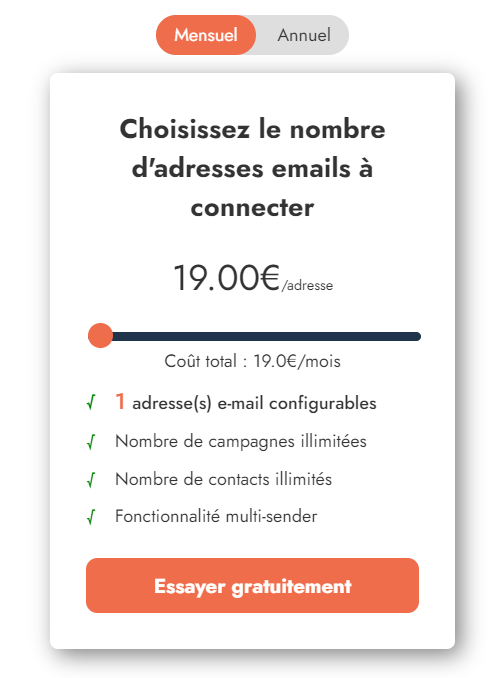
Emelia is a cold-mailing platform that stands out for its ease of use and competitive rates. It offers a range of features designed to optimize email campaigns and improve prospecting performance. Here’s an overview of Emelia’s main features:
- Spintext: This feature lets you create variants in email content to avoid being flagged as spam by mail servers.
- A/B Testing: Emelia facilitates A/B testing to fine-tune campaigns and increase conversion rates through small content modifications.
- Viewing responses: Emelia lets you quickly view prospect responses, so you can focus on the most promising leads.
- Automations: The platform integrates natively with major tools such as Zapier, n8n, Integromat and Make to automate workflows and save time.
Feedback from customers such as Alexandre Bellaich and Jimmy Fouani underlines Emelia’s efficiency and performance, as well as the fluidity of the platform, which makes it possible to launch efficient automations and sign contracts. In short, Emelia is an advantageous solution for marketers and entrepreneurs looking to run effective, large-scale cold-mailing campaigns.
Emelia first stood out for its low price in relation to all the features it offers. If you don’t have an extreme need for email prospecting volume, this is the tool for you.
Lemlist
Lemlist excels in email personalization, offering unique features such as the addition of personalized images and videos to emails. This ability to create highly personalized campaigns significantly increases open and engagement rates. For effective integration of Lemlist with your LinkedIn campaigns, I recommend this Lemlist X MirrorProfiles tutorial.
Instantly
Instantly is an email marketing platform specializing in cold emailing campaigns. It’s renowned for its ease of use and advanced features that optimize email deliverability. Here’s a description of Instantly’s main features, based on user testimonials and information available on their site:
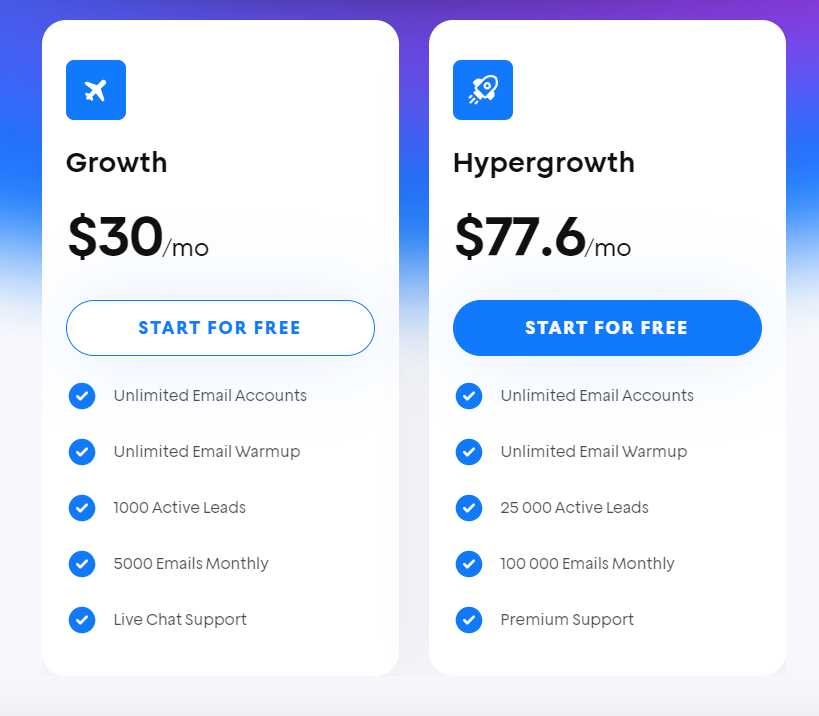
- Volume email management: Instantly lets you connect as many email accounts as you need under a single subscription, enabling you to send thousands of emails daily without compromising the sender’s reputation.
- Centralized response management with Unibox: Unibox enables you to manage dozens, even hundreds, of inboxes simultaneously, making it easier to tag leads and make contact to close deals.
- Campaign analysis: Instantly offers an advanced analytical dashboard to evaluate campaign performance and adjust strategies accordingly.
Testimonials from users such as Sam Wilson, Tony Liu and others underline Instantly’s edge over other tools on the market in terms of ease of use, optimized deliverability and quality of customer support. The platform is particularly appreciated by agencies, recruiters and contractors for its ability to manage large-scale prospecting campaigns.
Instantly is extremely interesting for high-volume B2B emailing. Indeed, it quickly made a name for itself for its simplicity in multiplying domain names in order to send more daily emails. Instantly is the emailing counterpart of MirrorProfiles for LinkedIn. Thanks to Instantly, you can have, for example, 5 domain names attached, and therefore a capacity of 1,000 emails per day.
It’s important to note that, although prospecting via LinkedIn is often more effective, emailing remains a powerful tool, especially when used as a complement. However, the key to success lies in managing email deliverability, a crucial aspect in ensuring that your messages actually reach your prospects’ inboxes.
By combining these tools and following emailing best practices, companies can maximize the impact of their digital marketing campaigns.
Enriching professional emails: tools and tips
Email enrichment is the process of deducing an email address from basic data such as a person’s first name, last name and company. The aim is to facilitate direct contact with potential prospects.
There are two main approaches to email enrichment: one is based on the exploitation of existing databases, while the other uses semantic techniques.
The first method is based on accumulating email addresses via the web and cross-referencing them with various databases to build up a marketable directory. However, this technique can give rise to problems of data updating, information quality and compliance with data protection regulations.
The semantic approach, on the other hand, involves generating combinations of probable email addresses based on the prospect’s first and last name and company domain, and then checking the validity of these addresses. For example, for a person named Frédéric Duhirel working at Stepward, the algorithm will search for variants such as frederic.duhirel@stepward.com, f.duhirel@stepward.com, and others until it identifies a valid address.
This method has the advantage of complying with personal data protection standards such as the GDPR, and of relying on up-to-date information, in particular by verifying the actual existence of the email address and using data provided by users on professional platforms that are regularly updated.
Following your LinkedIn campaigns, you’ll find yourself with an average of 60% of your database to re-engage through emailing. Here are the key steps:
- Export to CSV all prospects who have not accepted your connection request
- Normally you’ll have at least these 4 pieces of information: first name / last name / company and LinkedIn URL of your prospect
- Enrich your database with your prospects’ company websites
- Use one of these enrichment tools: Top 5 tools for enriching professional emails
Yes, we agree, step 3 must have made you frown, ahah. No, I’m not going to ask you to perform this operation by hand, as it’s extremely tedious and uninteresting.
Thanks to your prospects’ LinkedIn URL, you’ll be able to easily retrieve their company’s LinkedIn URL. To do this, simply run the prospect’s LinkedIn URL through a tool like Phantombuster or Captain Data.
Keep in mind that LinkedIn limits each account’s daily activity, so plan these exports in small batches; here are LinkedIn’s per-account limits. This is where MirrorProfiles can help: with several dedicated accounts, your weekly prospecting volume grows in proportion to the number of accounts, each staying within its own limits.
Then, with your company LinkedIn URLs, all you have to do is retrieve the company page to get the website, again with one of these two tools: Phantombuster or Captain Data.
If you find the handling complicated, don’t hesitate to ask us for advice.
With these 4 pieces of information:
- First name
- Last name
- Company name
- Company website
You’ll optimize the success rate of enrichment tools, and it won’t be surprising to recover around 50 to 60% of professional emails.
To make it more meaningful, let’s take an initial LinkedIn database of 1,000 rows. At the end of your LinkedIn campaigns, you have 600 rows, or prospects, who have not accepted your connection request. Following the steps I’ve explained above, you get 360 professional email addresses. That’s a lot if you had to contact them individually by hand. That’s why we presented our favorite tools for B2B email automation above.
Collecting email addresses via LinkedIn, using specialized tools to enrich this data, and launching targeted email campaigns form a strategic triptych for any digital marketer. By leveraging LinkedIn’s prospecting capabilities and complementing this with personalized email campaigns, companies can not only expand their network, but also engage more meaningfully with their prospects. Choosing the right tools and following best practices are essential to ensure the effectiveness and compliance of these strategies. Ultimately, the harmonious integration of these elements is the key to transforming LinkedIn connections into lasting, fruitful professional relationships.
FAQ – Frequently asked questions
Can you find someone’s email address on LinkedIn?
Yes, thanks to LinkedIn, when you’re on the 1st level of a relationship with someone, that means they’ve accepted one of your connection requests. So you go to their profile and click on Contact Info, to the right of the location.
How do you find a professional email address from a LinkedIn profile?
There are two ways:
First one, when you’re on the 1st level of a relationship with someone, that means they’ve accepted one of your connection requests. So you go to their profile and click on Contact Info, to the right of the location.
Second one, and the most powerful for me because we will have the professional email of your prospect (and I advise you to use only this one, never the personal one):
From LinkedIn you can export last name, first name, company and company website. These four pieces of information are essential for tools like Dropcontact, Icypeas, Snov etc. to reconstruct the person’s professional email. Above all, avoid Chrome extensions such as Contactout and the like: always use a CSV import, which is safer for your account.
So this second method allows you to have email addresses even if you’re not connected to this person on LinkedIn.
Can you find a LinkedIn profile from an email address?
Tools such as Dropcontact, Evaboot or Reverse offer this functionality. It’s very useful for switching leads that haven’t responded to your email campaigns to outbound campaigns on LinkedIn.
How do you find professional emails with Apollo?
It’s so easy! The Apollo tool is well designed and, above all, shares information with all its users. All you have to do is check the “With email” box when you search on Apollo. They’ve already done the work of enriching and testing business emails.
How do you find an email address in Sales Navigator?
In the same way as on classic LinkedIn, you go to the person’s profile, then click on “View in Sales Navigator” and at the bottom right you’ll see Contact information, where the email is. The only condition is that the user has not intentionally hidden their email address. What’s more, this email can be personal, as it’s usually the email used by the user to log in to LinkedIn. So it’s best to use enrichment tools for greater professionalism.











