



In today’s professional world, having an online presence has become essential. LinkedIn, in particular, has established itself as the go-to platform for professionals looking to expand their network, find new opportunities or simply keep abreast of trends in their sector. In this article, we’ll guide you through how to create a LinkedIn profile and optimize it.
Creating a good LinkedIn account
Why choose LinkedIn?
LinkedIn is much more than just a social network: it’s a platform dedicated to professionals, designed for networking, showcasing expertise and business visibility. Here are a few key reasons why you should consider using LinkedIn, whether you’re an individual looking to expand your professional network or a company looking to strengthen your online presence.
- Effective professional networking: LinkedIn is first and foremost a professional networking tool. It offers the possibility of communicating with people in your industry, opening the door to multiple opportunities: creating partnerships, recruiting, turning prospects into customers, and even generating additional sales.
- Express your expertise: Unlike other social networks, LinkedIn is specifically designed for professionals. This means you can share your views on relevant news, highlight your company’s values, or even debate topical issues. By intervening in a relevant and qualitative way, you not only reinforce your legitimacy, but also work on the e-reputation of your business.
- Boost your company’s visibility: Thanks to LinkedIn’s sophisticated algorithms, your interactions on the platform increase your visibility. And did you know that your LinkedIn posts are also referenced on Google? By adding relevant links to your site or blog in your publications, you can significantly increase traffic to your platforms.
- The recruitment platform par excellence: Whether you’re a candidate looking for a job or a company looking to recruit, LinkedIn is the place to be. As an individual, showcase your skills and experience, and let others know you’re actively looking. Companies, meanwhile, can publish their job offers, which will then be shared within the network.
Create an account on LinkedIn? Child’s play ^^
Here are the basic steps to create an account
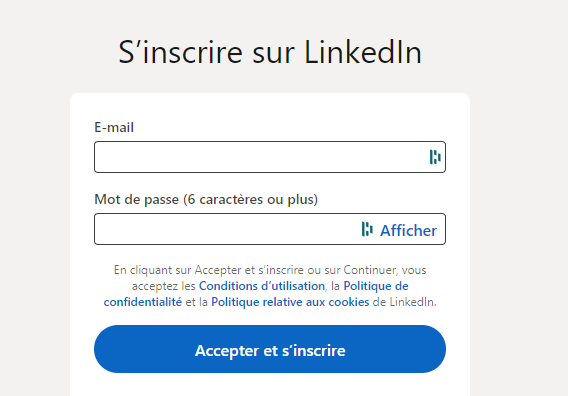
a. Sign up on LinkedIn with your email address. b. Fill in your personal details accurately. c. Select a profile photo that reflects your professionalism.
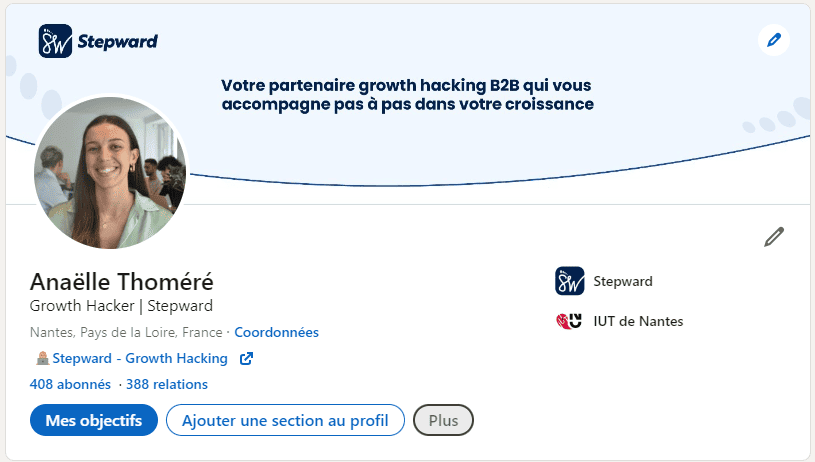
d. Write a summary that highlights your skills and aspirations.
Having an account is a good start, but how do you make sure your profile attracts attention?
Best practices for your LinkedIn account
LinkedIn is the platform of choice for professionals. To maximize your impact, here are some tips to get you started:
- Professional username: Opt for a simple username, like your first and last name, to make searches easier. Remember, you’re on a professional platform here.
- Relevant profile photo: First impressions count for a lot. A professional and engaging photo can increase the visibility of your profile. You don’t need a professional photographer, but make sure you look professional and welcoming. A profile without a profile photo is viewed 10 times less often than one with a photo.
What’s more, once you’ve created your account, you can choose to import contacts from your address book. This option simplifies your integration into the network by showing you the people around you who are already present on LinkedIn. This can make your initial networking much easier.
- Headline: Located below your photo, it should summarize your current position, training or services.
-
Presentation: This is an opportunity to highlight your career goals and aspirations.
-
Customize your banner: The banner, located behind your photo, can be used to highlight your current business or a past project.
-
Detail your experience: Think of this section as your online CV. Mention any professional experience you may have, including volunteer or community work, which can speak volumes about your personality and values.
-
Highlight your skills: Select your key skills wisely. Avoid information overload and concentrate on what really sets you apart.
-
Custom URL: Simplify access to your profile by customizing its URL. A simple combination such as “last-name-first-name” is often effective.
-
Stay active: Regular activity on LinkedIn shows your professional commitment. Interact with your network, share relevant updates and constantly expand your connections.
In addition, when fine-tuning your profile, take the time to optimize each section by writing a personalized summary. This is the section that will first capture the attention of your audience. A concise, well-structured summary, reflecting your personality and your professional ambitions and providing key information, can make a big difference.
If you’d like further advice on optimizing your profile, you’ll find everything you need in this guide.
An optimized profile is a major asset. But how can you and your company maximize the strategic use of LinkedIn?
Prospecting with LinkedIn for your business
For effective prospecting, it’s essential to use a personal LinkedIn account. This account must be associated with an identity, including a surname, first name, job title and company name. Once you’ve created your account, simply follow the steps below:
Building a solid network
Having an extensive network (over 500 contacts) is a major asset. LinkedIn is structured around a system of “circles” or connection levels, which determine how users interact and access other members on the platform.
- 1st (direct connections): these are people you’ve added as contacts and who have accepted your invitation, or vice versa. You can interact freely with them, view their full profiles, and send them direct messages.
- 2nd (your connections’ connections): these users are connected directly to your 1st-level contacts, but not to you. You can see their name and basic information, and you can add them to your network by sending them an invitation. Access to these profiles is more limited than to your 1st level connections.
- 3rd and beyond: 3rd-level connections are the contacts of your 2nd-level contacts. Your access to their information is even more restricted. Often, all you see is their name and professional title, with no further details. To interact with them, either add them to your network, or use InMail credits (LinkedIn’s premium service) to send them messages.
The importance of an extended network
The larger your 1st level network, the more 2nd and 3rd level profiles you have access to. This means you can potentially reach a larger number of professionals relevant to your business or prospecting objectives. An extensive network also increases the visibility of your profile, as you appear in searches for people connected to your direct and indirect contacts.
Network strategy
To maximize the effectiveness of LinkedIn for prospecting, it’s advisable to strategically expand your 1st-level network. This means connecting with relevant professionals in your sector, but also with people with a large number of connections, which indirectly extends your reach on the platform.
Using automation tools
Prospecting on LinkedIn can be time-consuming. Using automation tools can therefore be a wise strategy for optimizing your time and increasing your efficiency.
How can companies harness the benefits of LinkedIn?
LinkedIn, with its vast community of professionals and businesses, has become an essential tool for companies wishing to strengthen their online presence and achieve their goals. Here’s how they can make the most of this platform and set up a company page on LinkedIn to promote their services:
Talent search:
Thanks to its advanced search tools, LinkedIn has become a must for companies wishing to identify candidates or generate qualified leads on LinkedIn. The platform enables profiles to be filtered and identified on the basis of specific skills, previous experience, recommendations and many other criteria. Once potential candidates have been identified, companies can contact them directly via LinkedIn’s messaging system or by email, establishing a discreet, professional first interaction. What’s more, LinkedIn gives companies the chance to publish job advertisements. These advertisements are accessible not only to members actively looking for a job, but also to those who, although not active in their search, might be attracted by a new opportunity.
Content creation:
By regularly sharing relevant articles, case studies or news related to their sector, companies have the opportunity to stand out and establish themselves as opinion leaders in their field. This distribution of quality content stimulates interaction, whether in the form of comments, shares or discussions, amplifying the company’s visibility and consolidating its credibility with the community. It’s also essential to keep your company page up to date and polished. Such a page, regularly updated, attracts more visitors and projects a positive, dynamic image of the company.
B2B marketing:
With tools such as Sales Navigator and LinkedIn Ads, companies can target specific groups based on various criteria, such as company size, sector of activity or job title, optimizing the generation of qualified leads. What’s more, LinkedIn proves to be a facilitator in the creation of professional links. It offers companies the chance to connect with other market players, whether suppliers, potential partners or other companies, opening the door to new collaborations and the formation of strategic partnerships. LinkedIn is also an ideal platform for promoting professional events, whether webinars, workshops or other gatherings, reaching a specifically professional and engaged audience.
Let’s zoom in on prospecting on LinkedIn. This is a common strategy, but it calls for some care. LinkedIn limits each account, and an approach that is too aggressive can lead to restrictions on your personal account. What’s more, a clumsy approach can cost you valuable connections, diminishing your influence on the network.
This is where MirrorProfiles comes in.
MirrorProfiles is an independent platform that rents dedicated LinkedIn accounts. These professional prospecting accounts let you scale your prospecting without involving your personal account. Each account is manually warmed up over 4 months and has more than 500 real connections before it is made available. The accounts are ready for automation: you run your own tools and campaigns, with native integrations for GetSales, HeyReach, SalesForge and Waalaxy, and the rental comes with no commitment and monthly billing. And if an account ever needs to be replaced, MirrorProfiles replaces it in under 48 hours, so your campaigns keep running.
What’s more, using several dedicated accounts gives you the opportunity to multiply your reach on the platform, increasing your chances of making relevant connections. You can also adopt an account “verticalization” strategy, with accounts specialized by sector or niche, each with a professional image. This will refine your approach and make your prospecting even more effective.
In short, MirrorProfiles gives you the accounts and the platform to make the most of LinkedIn, while protecting your image and your network.
In the professional landscape, LinkedIn has established itself as the essential platform for professionals and businesses. Its strength lies not only in networking, but also in showcasing expertise, raising the profile of companies and attracting talent. Creating an account on this platform is a must! However, to succeed on LinkedIn, your profile must be well optimized. And while the platform offers countless opportunities, it also presents challenges, particularly when it comes to prospecting. A poorly calibrated approach can cost you connections or get your personal account restricted. It’s in this context that MirrorProfiles stands out, with dedicated accounts that make it possible to scale prospecting without involving your main account. By combining strategic use of LinkedIn with MirrorProfiles accounts, professionals can develop their outreach with confidence.
FAQ
Is prospecting on LinkedIn risky for my account?
Prospecting on LinkedIn with automation tools calls for some care. LinkedIn limits each account and may restrict an account whose activity it considers unusual. Serious tools keep each account within its limits, but a personal account remains exposed.
For example, inappropriate use of a LinkedIn account, such as sending mass messages, can lead to a restriction.
If your account is restricted, you risk losing access to all your accumulated relationships, contacts and databases.
What’s more, if an employee using his or her personal account for prospecting leaves the company, all contacts and information collected may be lost. It is therefore crucial to implement a strategy to secure this data.
What is the difference between a personal profile and a company page?
Having explored the importance of a personal LinkedIn profile for prospecting, it’s essential to understand the role and creation of a LinkedIn company page.
A LinkedIn company page is a public profile representing your organization. It lets you showcase your company, its products and services, and publish relevant content to build and strengthen your employer brand. Your company will be visible and recognizable with a professional logo and cover image. These visual elements are essential for creating a positive first impression. Here you can describe your company, highlighting your values, your mission and what sets you apart. You can even invite your employees, partners and customers to follow your page to increase its visibility.
Your company page belongs to your company, not to a personal account. It’s important to note that, unlike a personal profile, a company page cannot send private messages to LinkedIn users. This prevents its use for direct prospecting.
A practical answer to this problem is to use MirrorProfiles.
MirrorProfiles provides dedicated professional accounts, rented by the company: your sales reps prospect with them, and the network and conversations stay with the company. This makes it possible to carry out prospecting activities while preserving the integrity of employees’ personal profiles, within our usage rules.
In short, while LinkedIn company pages are crucial for visibility and branding, for direct, personalized prospecting, the use of individual accounts, such as those provided by MirrorProfiles, remains a more suitable strategy.
Why rent MirrorProfiles accounts rather than use employees’ accounts?
Renting MirrorProfiles accounts means that companies can avoid using their employees’ personal accounts for prospecting or recruiting, and they also multiply their prospecting volume.
Compatible with any secure B2B outreach tool, with native integrations for GetSales, HeyReach, SalesForge and Waalaxy, MirrorProfiles provides stable, dedicated LinkedIn accounts. They are manually warmed up over 4 months and have more than 500 real connections before they can be rented.
Our key arguments:
- You can contact several thousand people while keeping your current sales team. Our clients typically equip each sales rep with 5 to 6 accounts; with 10 accounts, that’s 1,000 to 1,200 connection requests per week.
- You keep your leads and your network, even if your sales rep leaves your company.
- You keep your colleagues’ personal LinkedIn accounts out of prospecting.
One of the main advantages of renting MirrorProfiles accounts is the preservation of your business pipeline, even in the event of a change of personnel, since the account belongs to the company and not to the individual.
This solution also enables you to run several LinkedIn accounts from one platform, increasing your prospecting opportunities. And if an account ever needs to be replaced, we replace it in under 48 hours.
Can I create a company page without a personal LinkedIn account?
There’s no way to create a company page without linking it to a LinkedIn account, because it needs an administrator. One option is to make a dedicated MirrorProfiles account the administrator of your company page. This way, you avoid linking your company page to a personal LinkedIn account that may not belong to your company. This method is also widely used by those who don’t want to have 2 different communications for two different companies on their LinkedIn account, to avoid confusing their potential prospects.
Does my profile need to be perfect to prospect?
Too many people get caught up in the idea that it’s the good-looking, well-informed LinkedIn account that will make the difference. But it’s not! You need to take care of your photo and your headline, because these are what 98% of prospects will see before accepting your connection request.
Nevertheless, if you want to have a perfect profile, which is very useful if you’re publishing LinkedIn posts and therefore want to work on inbound marketing on this acquisition channel, then I invite you to follow all our tutorials on this subject in our guides to optimizing your LinkedIn profile.
When should I create my LinkedIn account?
Right away ahah. The sooner you create your LinkedIn account, the sooner you’ll be able to develop your professional network, prospect, recruit, etc. Having a LinkedIn account today is essential for professionals. It’s like a website for a company. Your LinkedIn account is your own website.











