



Introduction
This SalesMind AI tutorial shows how combining SalesMind AI with MirrorProfiles gives you a powerful setup for prospecting and recruiting on LinkedIn. This pairing relies on AI and targeted strategies, and changes the way you work on LinkedIn. In partnership with the SalesMind AI team, we’re delighted to present a comprehensive guide full of sound advice and practical tips.
Discover how SalesMind AI features, combined with MirrorProfiles, can enhance your LinkedIn presence and generate leads. We reveal how to get the most out of the combination of our two tools.
What is SalesMind AI?
SalesMind AI is a prospecting tool for LinkedIn. It combines artificial intelligence with sophisticated algorithms to automate and personalize your sales approach.
This platform offers features such as AI-driven lead analysis, automated prospecting on LinkedIn and enhanced sales conversations. Designed for companies looking for effective, impactful engagement on LinkedIn, SalesMind AI raises the level of your prospecting, making every interaction on the platform more strategic and results-driven.
The main features of SalesMind AI
Lead analysis with Artificial Intelligence
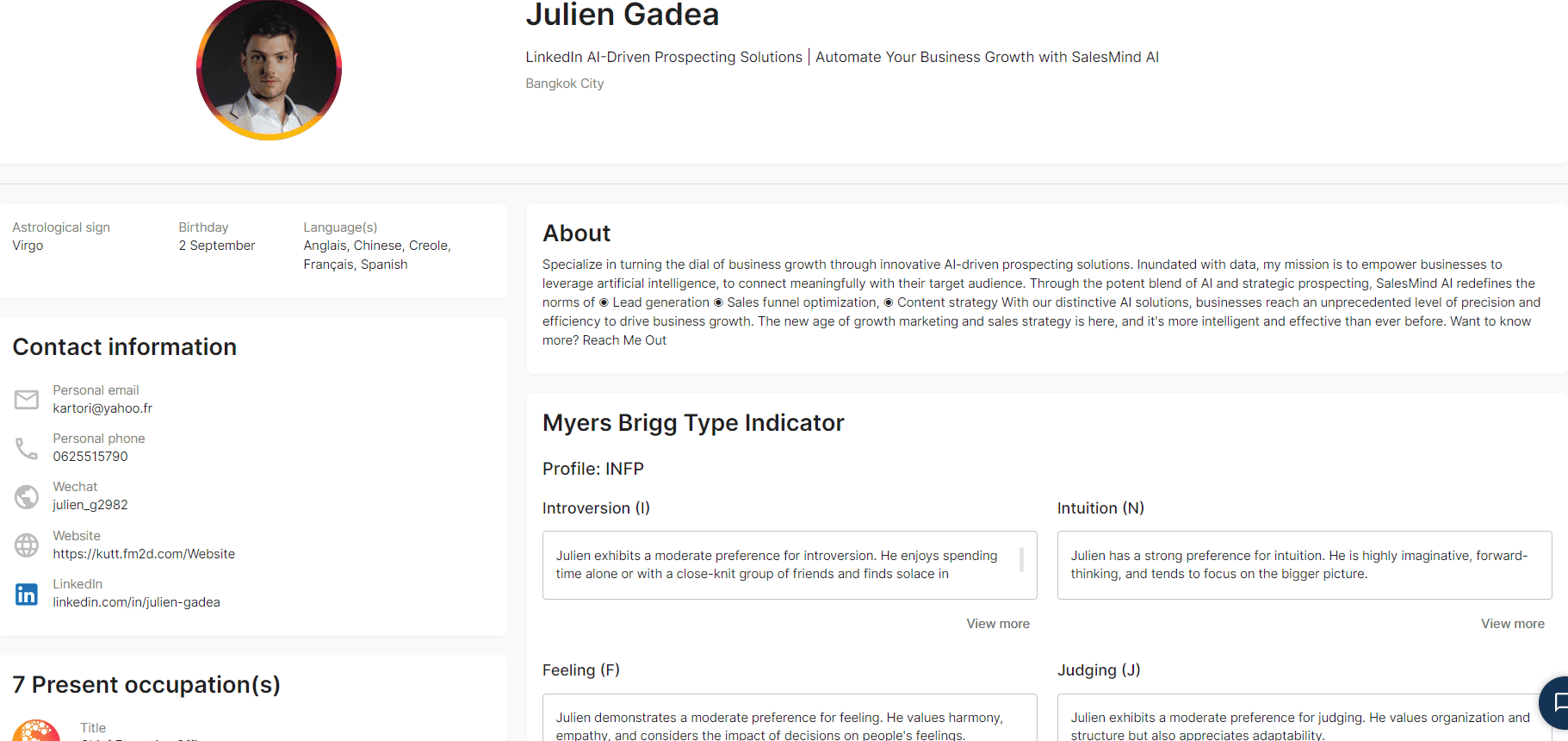
SalesMind AI’s Prospect Analysis function makes a real difference when it comes to understanding LinkedIn prospects. It analyzes LinkedIn profiles in depth and gathers key data such as location, contact information, birthday, languages spoken, career path and education. Most impressively, it uses the Myers-Briggs Type Indicator (MBTI) to provide a psychological profile, such as the INFP personality type. This feature enables a nuanced understanding of prospects, which is essential for developing highly personalized and effective approach strategies. It is invaluable for those seeking a comprehensive understanding of their prospects, turning raw data into strategic information.
To illustrate this, imagine that you have a detailed profile of your prospects, showing their MBTI type, interests and professional background. This information becomes a powerful tool for adapting your approach and strengthening engagement and connection.
Automated LinkedIn sequences
SalesMind AI’s LinkedIn prospecting automation redefines the way prospecting is conducted on the platform. It allows you to:
- Connect any LinkedIn account: whether it’s a MirrorProfiles account or your own LinkedIn account.
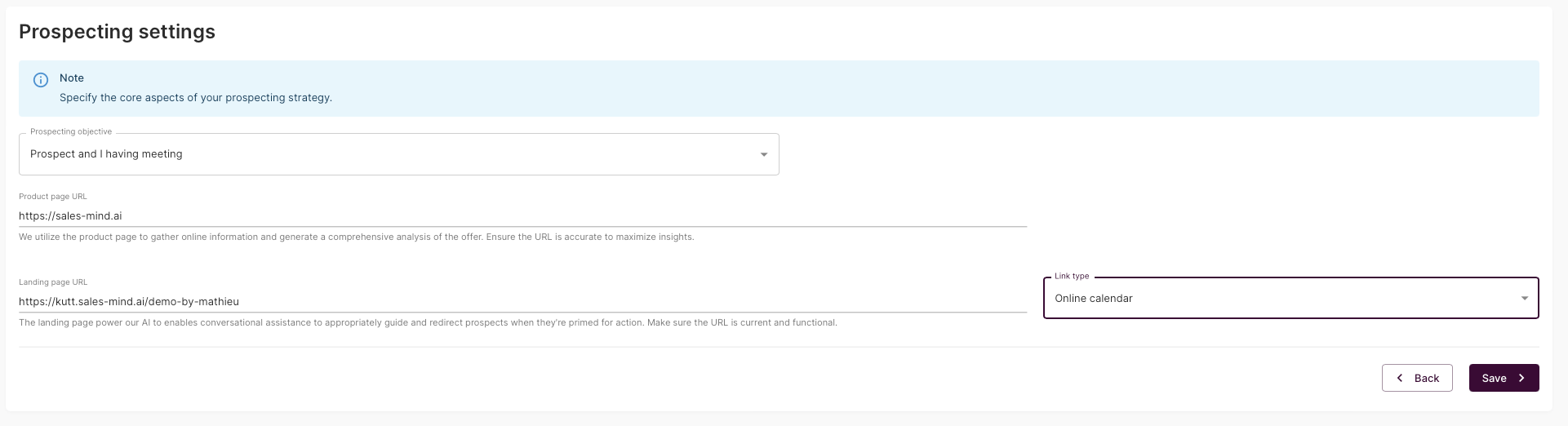
- Define the objective of your prospecting campaigns: share your website URL to inform the AI about the product or service you’re promoting. Also provide a landing page URL to encourage prospects to take specific actions, such as booking an appointment. The AI analyzes the URL of the product page to support ongoing conversations.
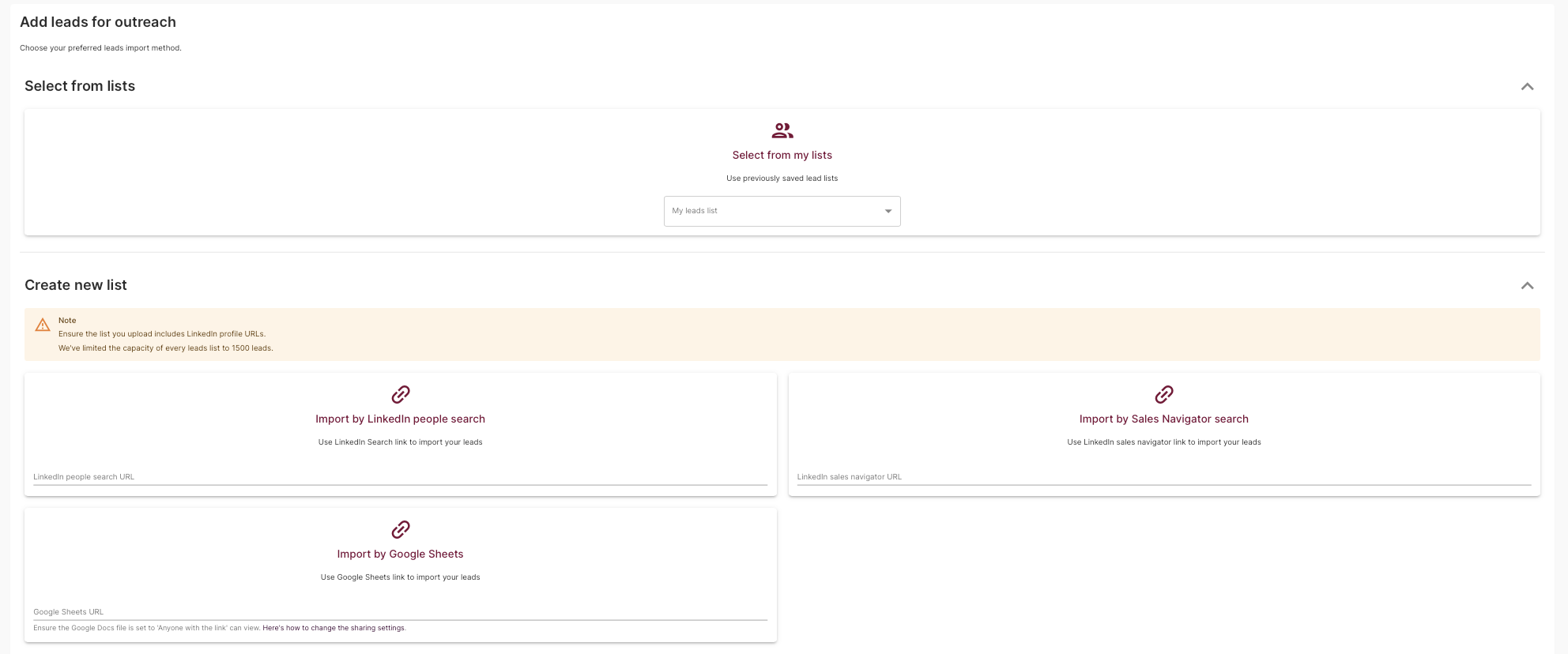
- Target relevant prospects: choose prospects from SalesMind’s existing list, or import them manually from LinkedIn or LinkedIn Sales Navigator. This feature streamlines the process by automatically pulling profiles from searches.
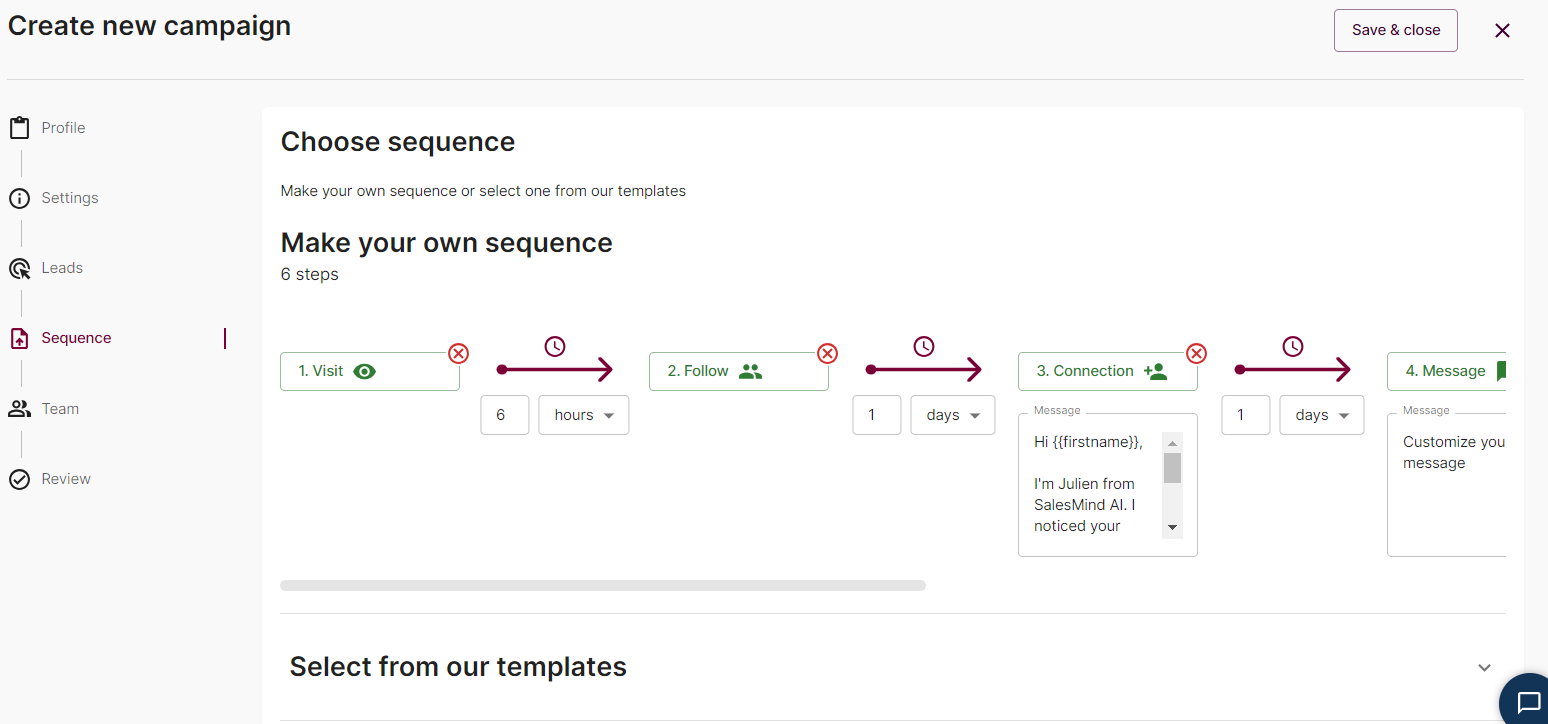
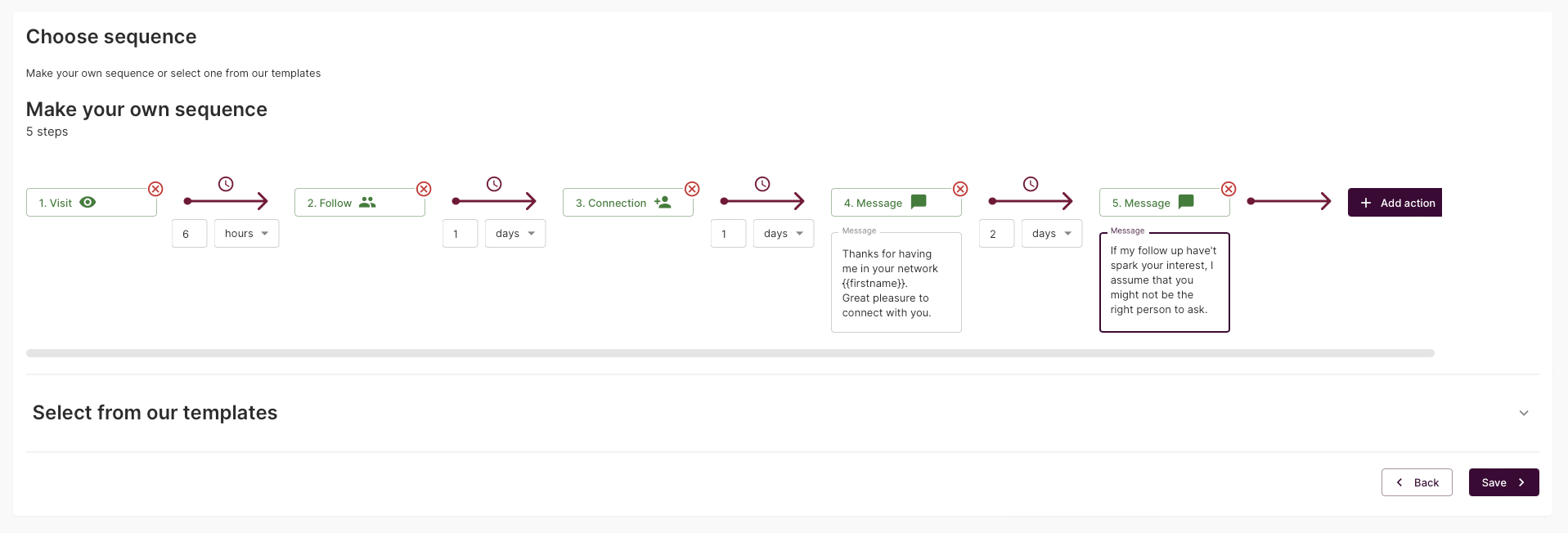
- Create customizable LinkedIn sequences: develop a personalized sequence or use templates for automated actions (visit, follow-up, connection, message) and define the timetable for each one. While the initial sequence is created manually, the AI takes over when a response is received.
- Select team access: assign campaign access to different sales reps within your team. This improves collaboration. Very useful for managing several LinkedIn prospecting accounts.
To give you a clearer idea, here’s an overview of the initial sequence configuration, which automates actions such as visiting, following up and sending messages to the prospects you’ve defined:
AI Sales Conversational
AI Sales Conversational enables personalized sales engagement. It uses AI to create conversations that are not just automated, but intelligently tailored to each prospect. Here’s how it works:
- Use of supplied URLs: the AI uses the product and landing page URLs entered during the prospecting automation stage on LinkedIn. It carefully analyzes these pages, as well as the LinkedIn account connected to SalesMind, including the associated role and company.
- Seamless transition from automation to conversation: as soon as a prospect responds, SalesMind AI steps in with detailed analyses of the prospect’s LinkedIn profile and the LinkedIn account selected by the user. This enables the AI to craft answers that resonate with the prospect’s interests and needs.
- Continued conversation with a personal touch: the AI seamlessly continues the conversation after the initial automated sequence, using all the data collected. This ensures that each message is not only contextually appropriate, but also personal and engaging.
- User control and personalization: despite the high level of automation, users retain control of the conversation. They can choose from several answer types, such as icebreakers or personal presentations, and select between two AI-generated answer variants. Each message can be reviewed and customized before being sent, ensuring that it perfectly matches the user’s approach.
- Data-driven answers: all backed up by comprehensive prospect analysis data. This data informs the AI, enabling it to create responses that are not only relevant but also likely to engage and convert.
Here’s a video to give you a better understanding of this feature, which is unique on the market for MirrorProfiles-compatible automation tools.
AI Profile: automatically optimize your LinkedIn profile
SalesMind AI Profile Enhancer is a powerful tool for optimizing your MirrorProfiles LinkedIn account. It’s a great feature, given that our accounts can be customized (headline, bio, positioning) within our usage rules, and a perfect complement to our guides on optimizing a LinkedIn profile.
Based on campaign performance and user data, it provides personalized recommendations to improve the effectiveness of your profile. This tool meticulously analyzes various profile elements such as title, summary, professional experience and much more, to ensure that your presence on LinkedIn is aligned with your professional goals.
By optimizing your profile for LinkedIn’s search algorithms, the AI Profile Enhancer improves your visibility to customers and contacts. It intelligently identifies and integrates the right keywords and strategies, improving your profile’s ranking in search results. This improvement is not just aesthetic; it’s about making your profile a magnet for opportunities, be they jobs, leads or business relationships.
Use Cases and examples
Example for a real estate company
A real estate company wants to expand its customer base and target potential buyers and investors on LinkedIn using SalesMind AI.
- Our client selected a MirrorProfiles account and connected it to SalesMind AI. They then automated the contact process, initiating connections with LinkedIn users interested in real estate investment, home buying and property management.
- Tailor-made campaigns based on market trends: by analyzing current trends in the real estate market, SalesMind AI personalizes the message in the outreach sequence. It integrates market data, new listings and investment opportunities into the messages. The AI adapts the flow of the conversation based on the prospect’s responses, using data from their LinkedIn profiles to discuss relevant property types, locations and investment strategies.
- Improved relationships: the AI’s ability to provide personalized follow-ups based on the prospect’s profile leads to more meaningful interactions. For example, if a prospect shows interest in luxury properties, the AI adapts its communication to highlight exclusive listings, information on the luxury real estate market and personalized investment advice.
Example for a SaaS company
A SaaS company seeks to improve customer engagement. To do this, it decided to use SalesMind AI to engage prospects interested in its software solutions. Here, the client uses several MirrorProfiles accounts to personalize its newsletter, its support and, more generally, its lead nurturing strategy.
- Improved customer onboarding and product engagement: the AI Sales Conversation feature analyzes the prospect’s company size, industry and role from their LinkedIn profile to create personalized conversations about how the SaaS product can meet their specific business needs.
- Highlighting product features based on the prospect’s business challenges: the AI identifies the key challenges facing the prospect’s industry (such as data management in the technology industry) and crafts messages highlighting the relevant features of the SaaS product. For example, if the prospect belongs to a technology company that struggles with data analytics, the AI focuses on the advanced analytics features of the SaaS product.
- Ongoing engagement and lead development: after the initial interaction, the AI continues the conversation by sharing case studies, user testimonials and how-to guides relevant to the prospect’s business needs. This ongoing engagement nurtures the prospect throughout the sales funnel, increasing the chances of conversion.
Explanation of each tab
Campaigns
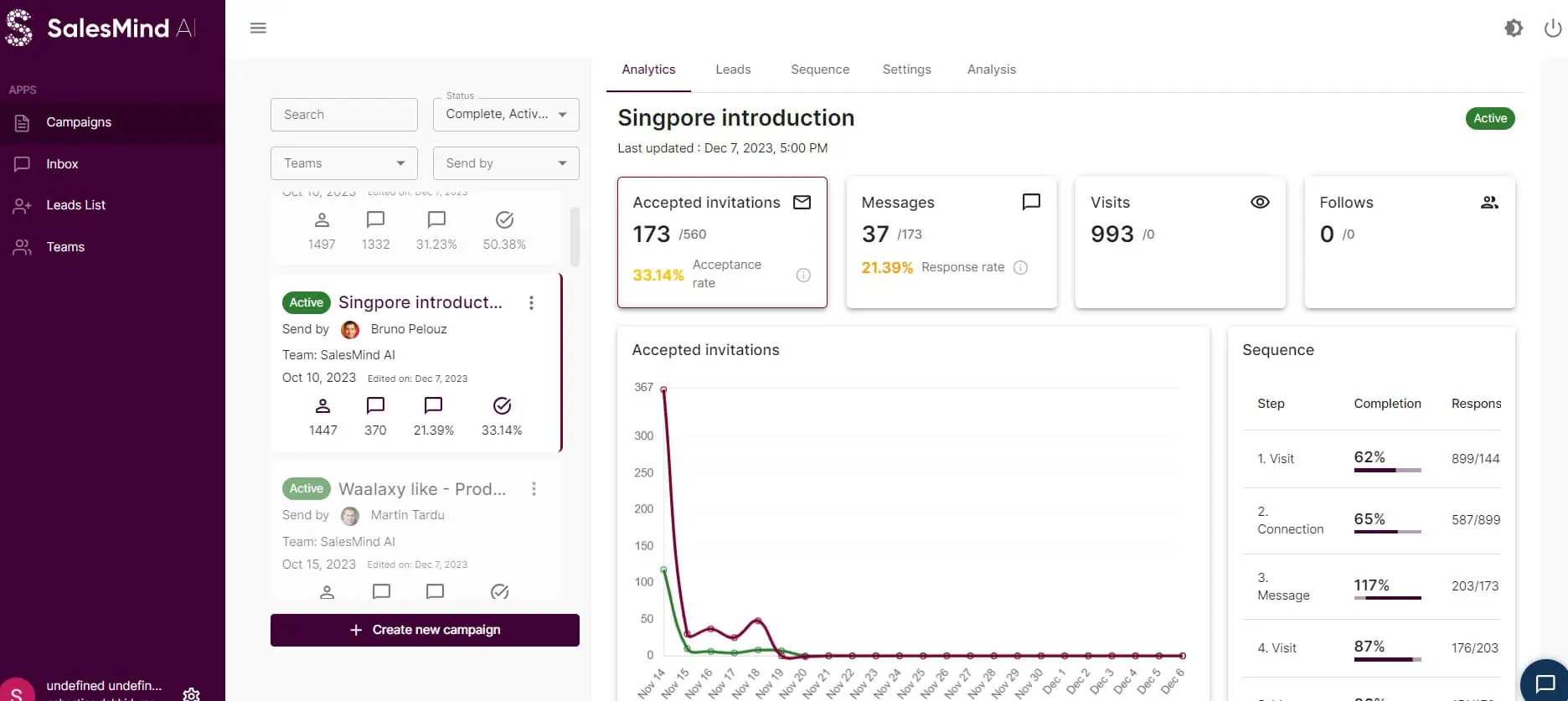
SalesMind AI’s “Campaigns” tab serves as a central overview of all your LinkedIn campaigns. This feature helps companies track and optimize their prospecting efforts across different teams.
Filtering options:
- Search by campaign name
- Filter by campaign status: organize campaigns according to their current status, including Completed, Active, Paused.
- Filter by team: display campaigns managed by specific teams.
- Filter by LinkedIn account: sort campaigns according to the LinkedIn account used to send messages.
Analysis sub-tab:
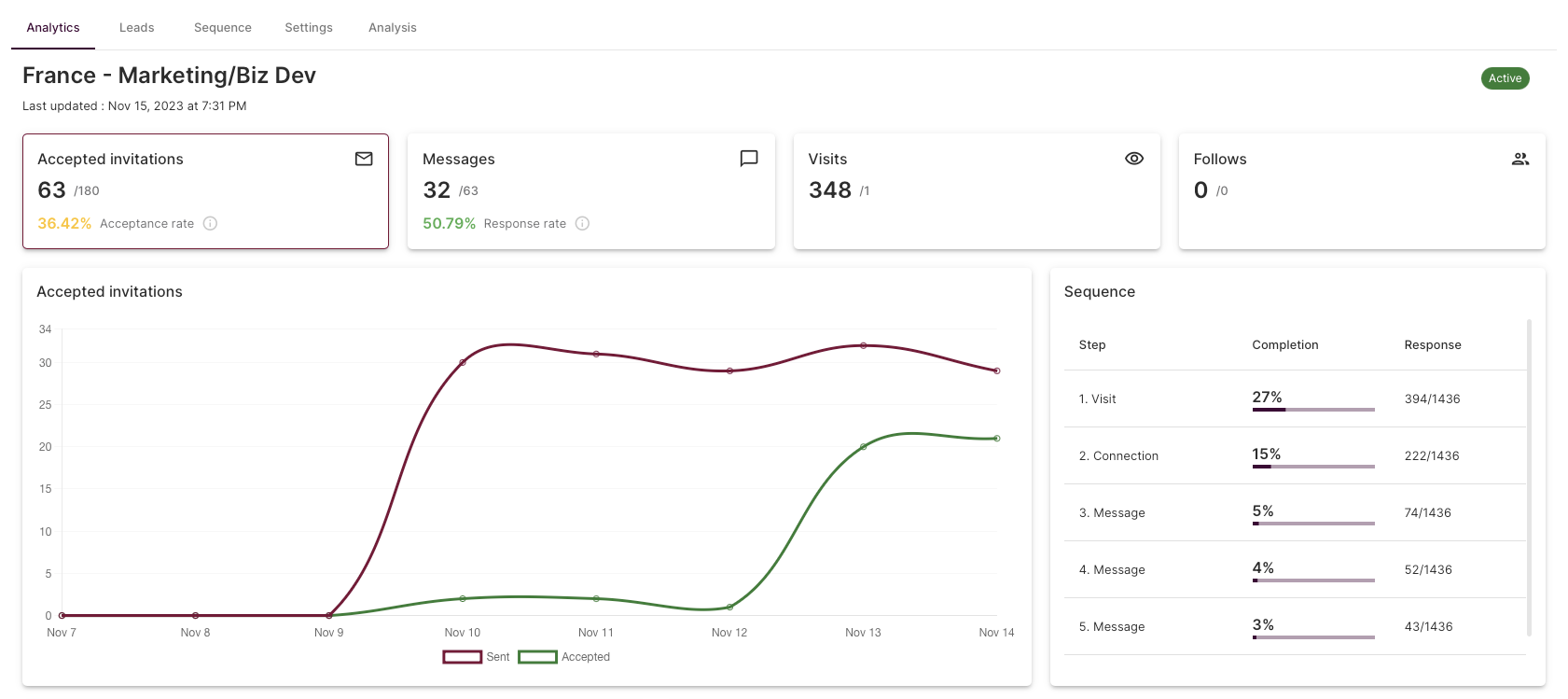
- Acceptance and response rates: monitor the success of connection requests and message engagement.
- Visits and follow-up.
- Time-based invitation acceptance graph: visualize the trend of accepted invitations over time. Here’s an article on how to achieve an acceptance rate of over 50%.
- Sequence completion rate: evaluate the effectiveness of each stage of your prospecting sequence.
- Lead qualification indicators: evaluate prospects according to different levels of qualification, from “not interested” to “qualified prospect”.
- Recent messages overview: view the latest messages received for a given campaign.
- Understanding the AI analysis: based on the URLs provided and the campaign objectives. You can view and edit details such as product descriptions, features, benefits, unique selling points, etc. This section includes comprehensive information on the product, how it compares with competitors, technological innovation, the product life cycle and possible objections, providing a better understanding of how the AI develops its strategy.
Leads sub-tab:
- List of prospects and company details: access a complete list of targeted prospects and their respective companies.
- Interaction overview: view the sequence of interactions with each prospect.
- Profile overview: analyze leads using AI lead analysis.
- Complete conversation history: view the complete history of conversations with each prospect.
- Direct access to LinkedIn profiles: open your prospects’ LinkedIn profiles directly.
Sequence sub-tab:
- Sequence customization: you can change your sequence as you go along to maximize your KPIs.
Settings sub-tab
- Change settings: modify campaign parameters such as the LinkedIn account used for prospecting, the objective and the product and landing page URLs.
Inbox
SalesMind AI’s “Messaging” tab is designed to streamline the management of conversations with prospects generated by your campaigns. It’s a central point for all communications, so you never waste time on LinkedIn.
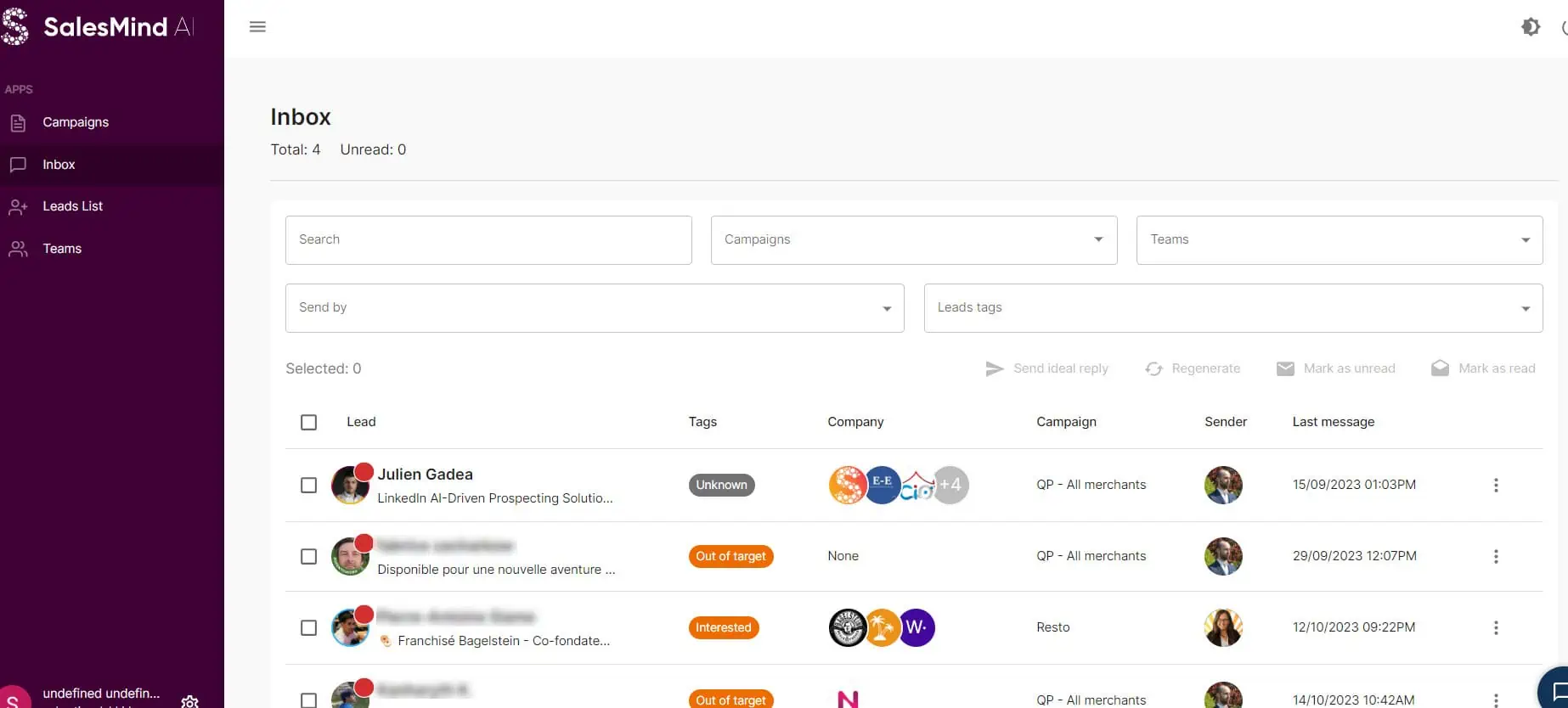
Overview of conversations and statuses:
This tab displays a list of all conversations initiated with potential customers as part of your various campaigns, making it easy to keep track of your interactions.
Conversations are marked by statuses:
- No notification means no response from the prospect.
- A red circle with a number indicates that the prospect has sent unread messages.
- A simple red circle indicates that it’s your turn to answer.
Inbox search filters:
To find specific conversations quickly, use the filters at the top of the list. These filters include options such as lead name, title, company, campaign, team, sender and lead tags.
Details of LinkedIn exchanges:
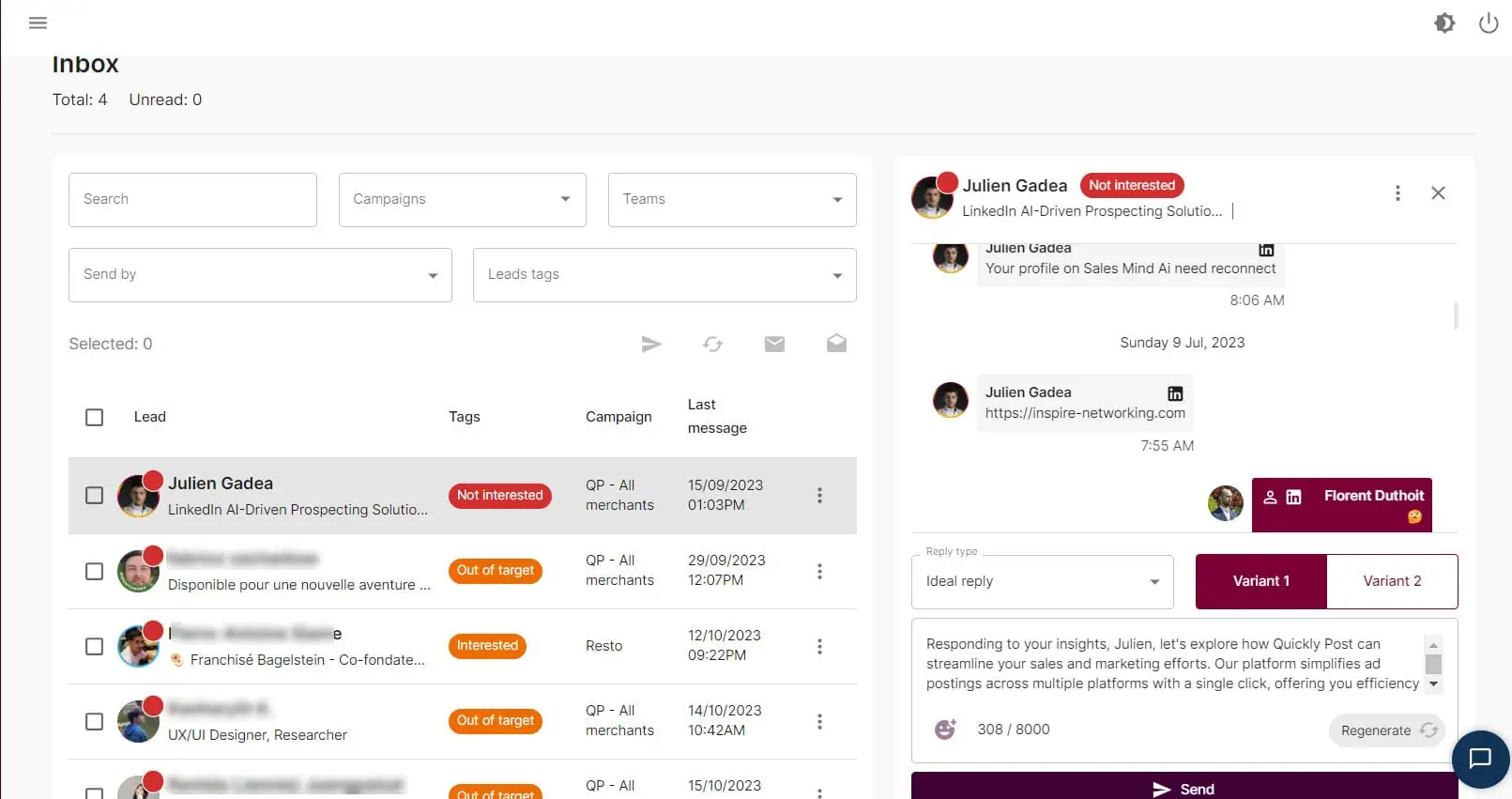
Clicking on a conversation displays the entire dialogue with a prospect for a specific campaign. It includes all messages exchanged and actions carried out.
In each conversation, you can respond directly to prospects. The chat window enables immediate engagement. It keeps the conversation flowing smoothly and without interruption.
Suggested answers using AI:
The platform offers AI support to help develop customized answers. You can select the type of response required and choose between two AI-generated variants.
Each message suggested by the AI can be modified and adapted to better suit the context, or regenerated if it doesn’t meet your needs, offering total control over communication.
Leads List
SalesMind AI’s Lead List tab is designed for efficient management of lead data.
In this tab, users can view all the prospect lists they have imported into SalesMind AI. The platform lets you add new prospect lists with a simple click. This addition is not just a question of quantity. It is designed to improve the organization and accessibility of prospect data.
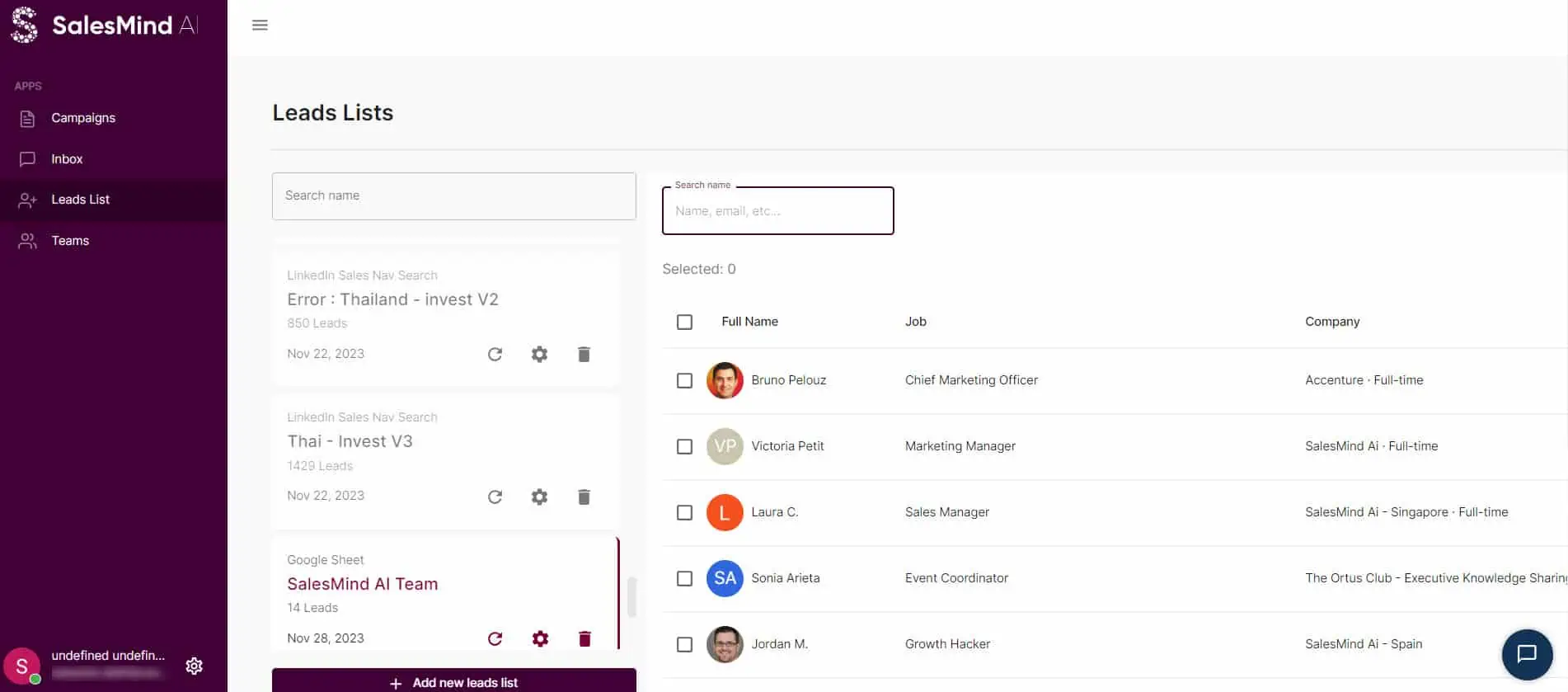
SalesMind AI offers users several ways of creating prospect lists. In particular, they can import leads directly from a Google Sheets link, use a LinkedIn Search link or a LinkedIn Sales Navigator link. However, it’s important to note that each prospect list has a capacity limit of 1,500 prospects.
To make prospect management easier, SalesMind AI includes filtering options in the Prospect List tab.
Teams
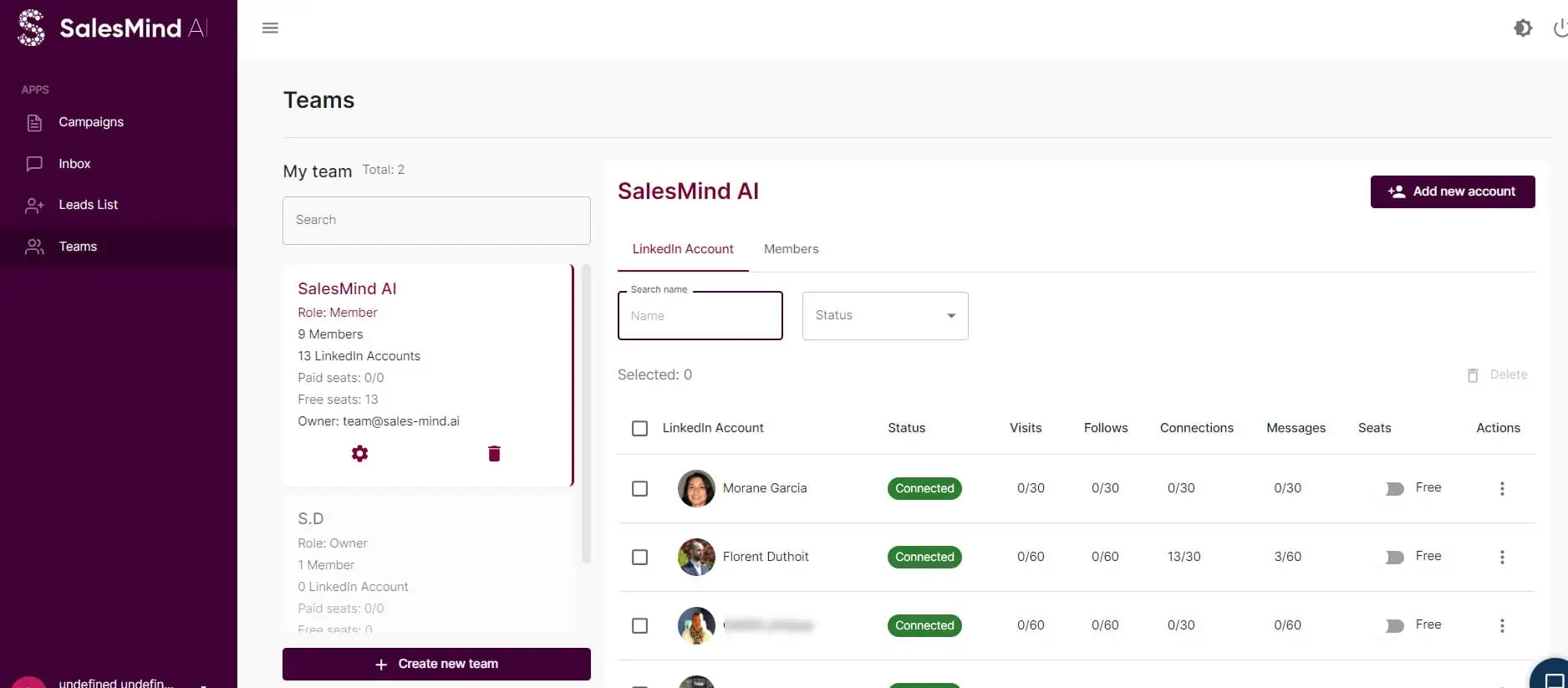
The Teams tab in SalesMind AI is a crucial component for managing collaboration within the platform. This tab provides a clear overview of all the teams to which you belong.
By selecting a specific team in this tab, you can view the team members associated with it. This feature is particularly useful if you use MirrorProfiles accounts with different verticals and copywriting strategies. For example, one SalesMind AI team could be dedicated to promoting your webinars, and another team to generating appointments and demos.
How do I launch a campaign on SalesMind AI?
a) Connect your MirrorProfiles LinkedIn account
- Go to your MirrorProfiles account via your platform and download the SalesMind AI extension.
- Log in to your SalesMind AI account.
- Add a new account to your team: in the Teams section, add a new account to your team. To do this, follow the instructions and use the interface provided.

 4. Set the country you’re connecting from: if you’re not sure, ask the MirrorProfiles team.
 5. Account verification: once you have entered your details, your account will go through a verification procedure. This usually takes a minute.
Follow these steps to make sure your LinkedIn account is connected to SalesMind AI.
b) Build your prospecting lists with LinkedIn
Creating a targeted prospecting list on LinkedIn is an essential step in launching a successful campaign. For more details, please consult the following articles:
- For classic LinkedIn: How can I do precise searches on LinkedIn?
- For LinkedIn Sales Navigator: How do I know that my prospects are on LinkedIn?
On SalesMind AI, here are some examples of how to effectively gather and organize your leads:
In the case of classic LinkedIn:
- Start by using LinkedIn’s search bar to find potential prospects. For example, you can search for “Marketing Manager”.

- Refine your search by selecting “People” in the search bar and applying relevant filters, such as location, industry or current company.

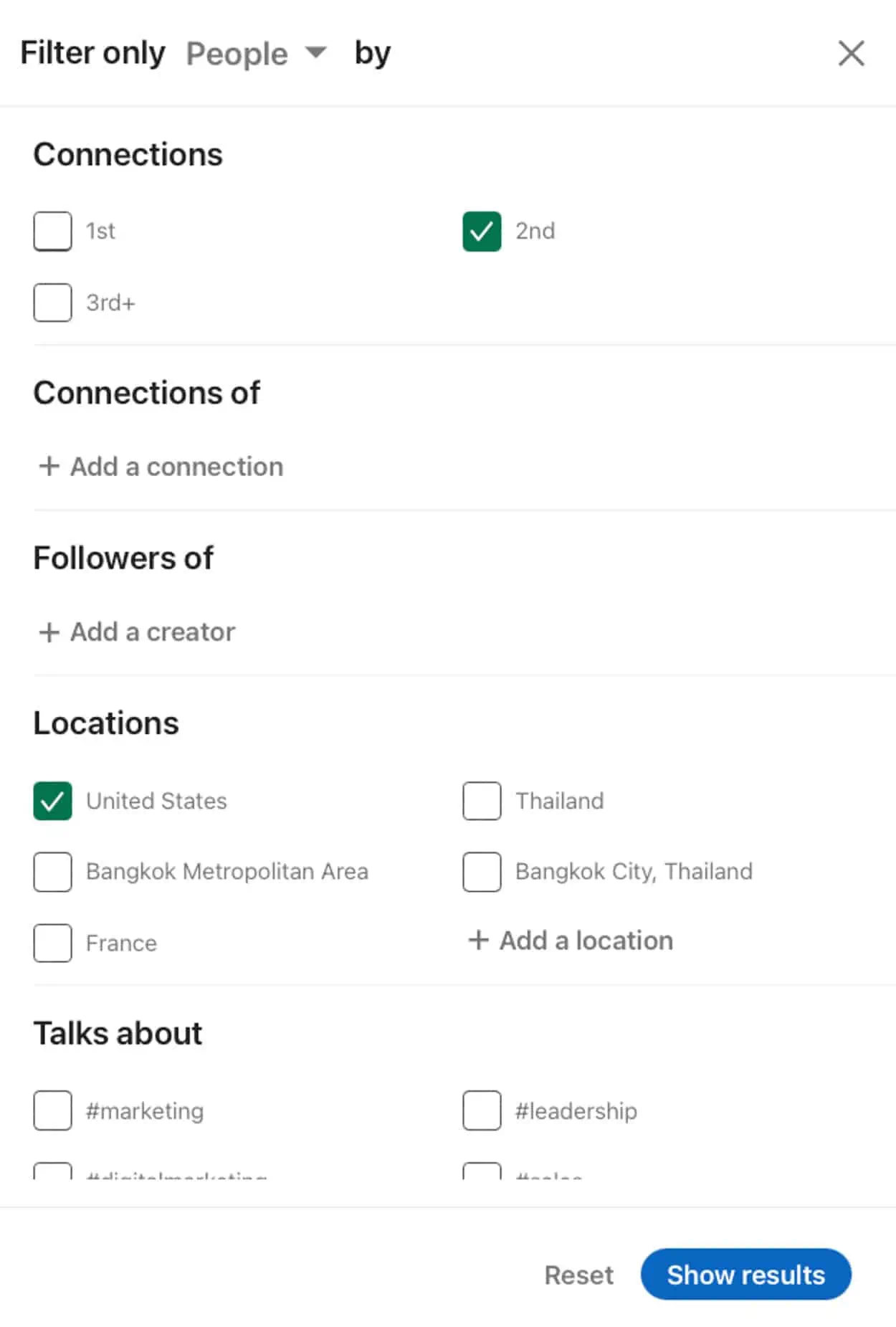
- Copy the search URL.

- Paste this search URL directly into SalesMind AI.
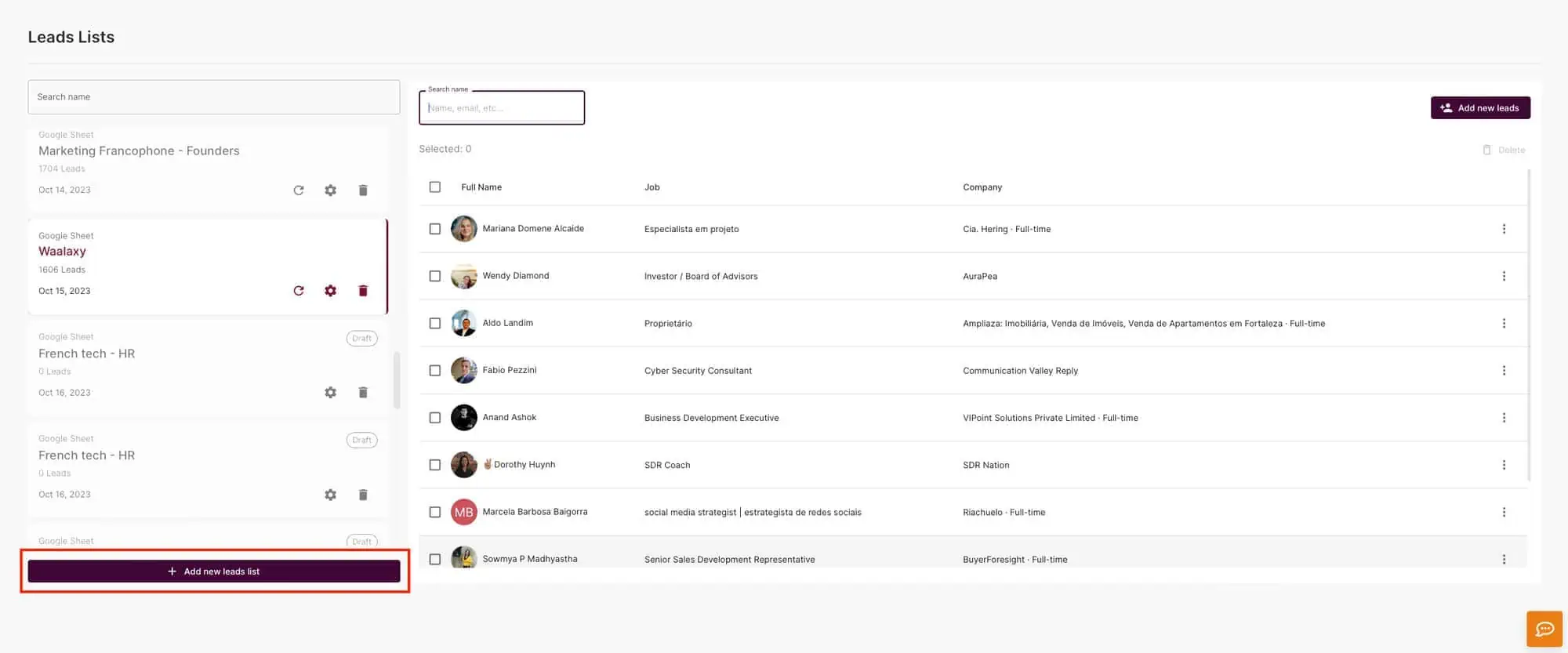
- Name your prospect list, for example “Marketing Manager, USA, 2nd”.

- Remember that each LinkedIn account will produce different results. Make sure you select the right account to import your list.
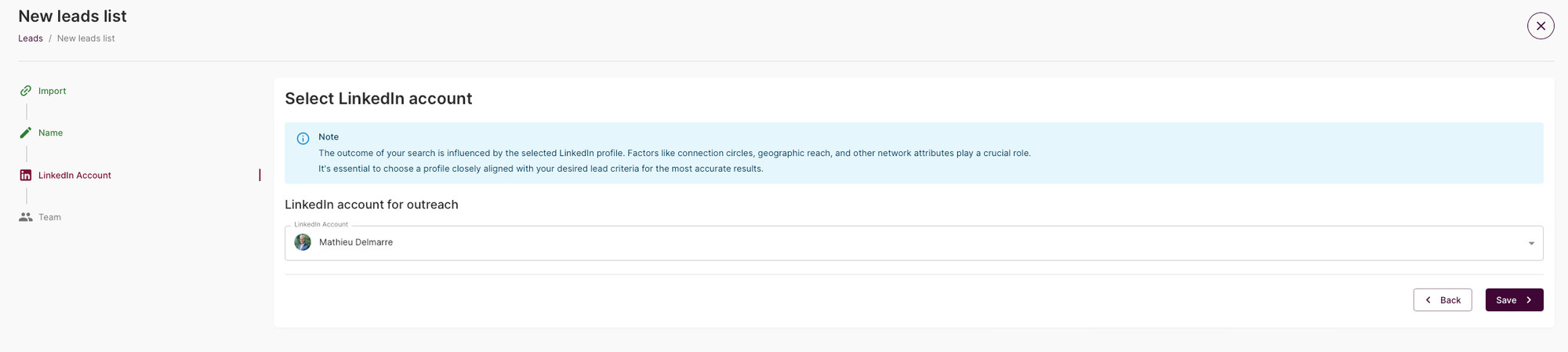
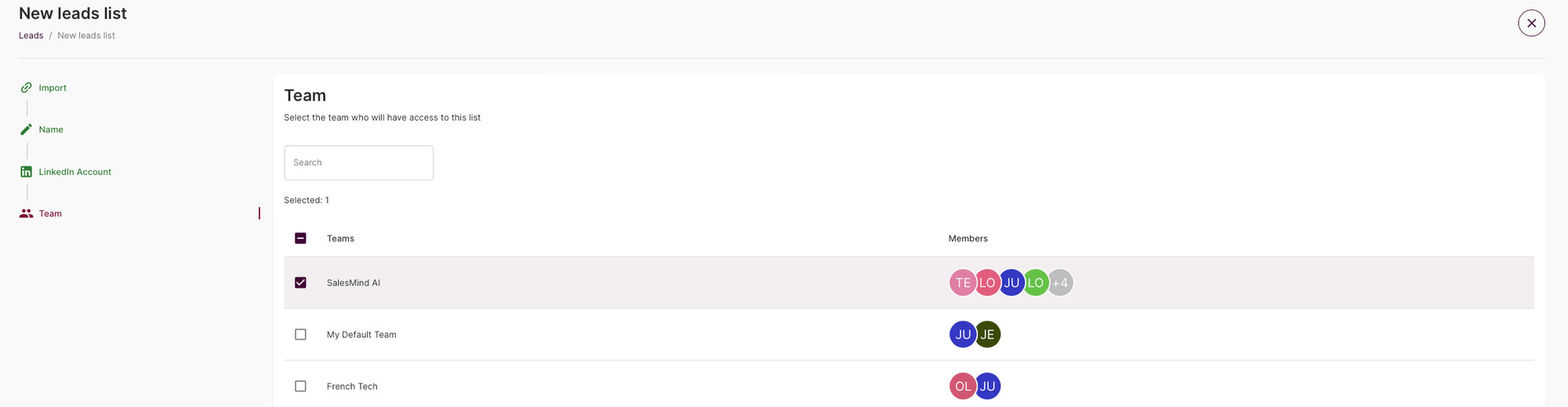
- Share the list within your team for collaborative work.
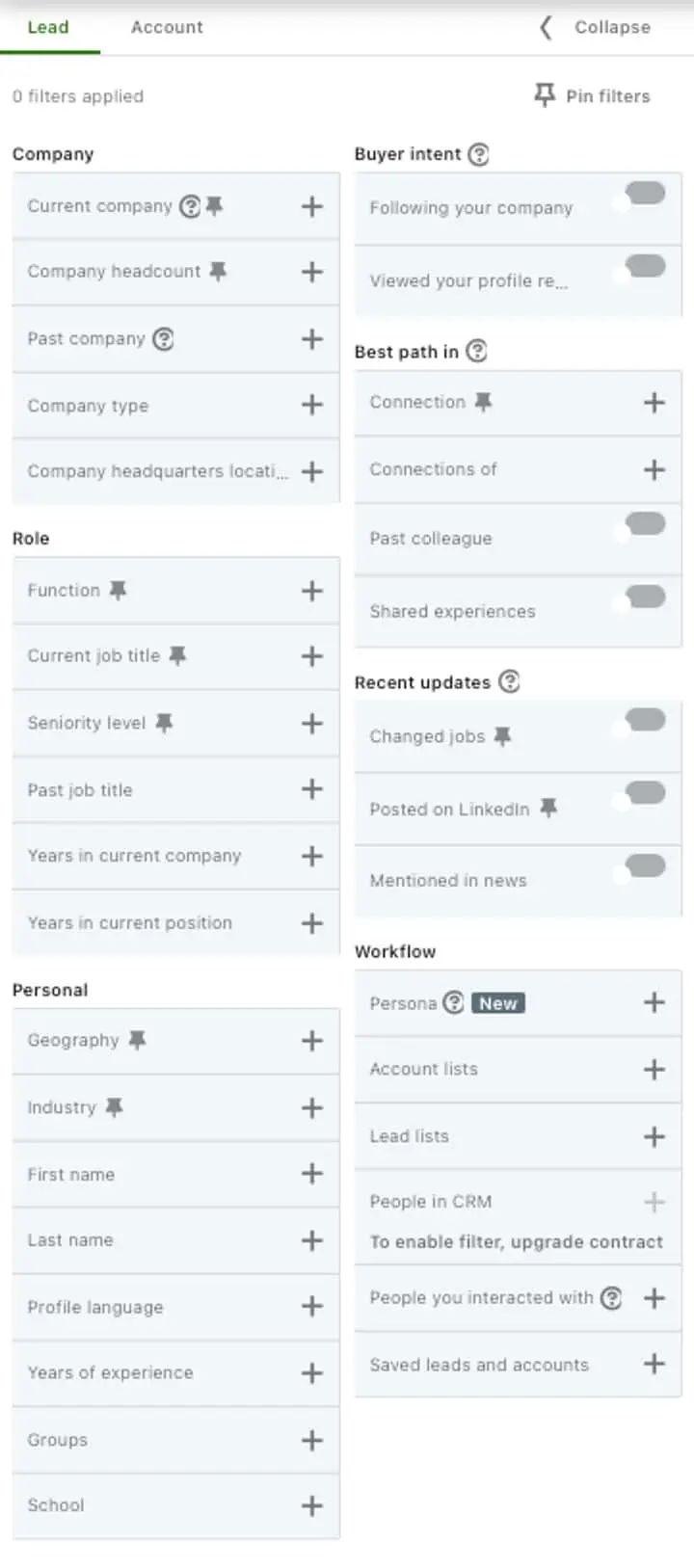
In the case of LinkedIn Sales Navigator:
Use Sales Navigator’s additional filters to create a precise audience. By the way, if you use Sales Navigator, here is how to combine it with MirrorProfiles 😉
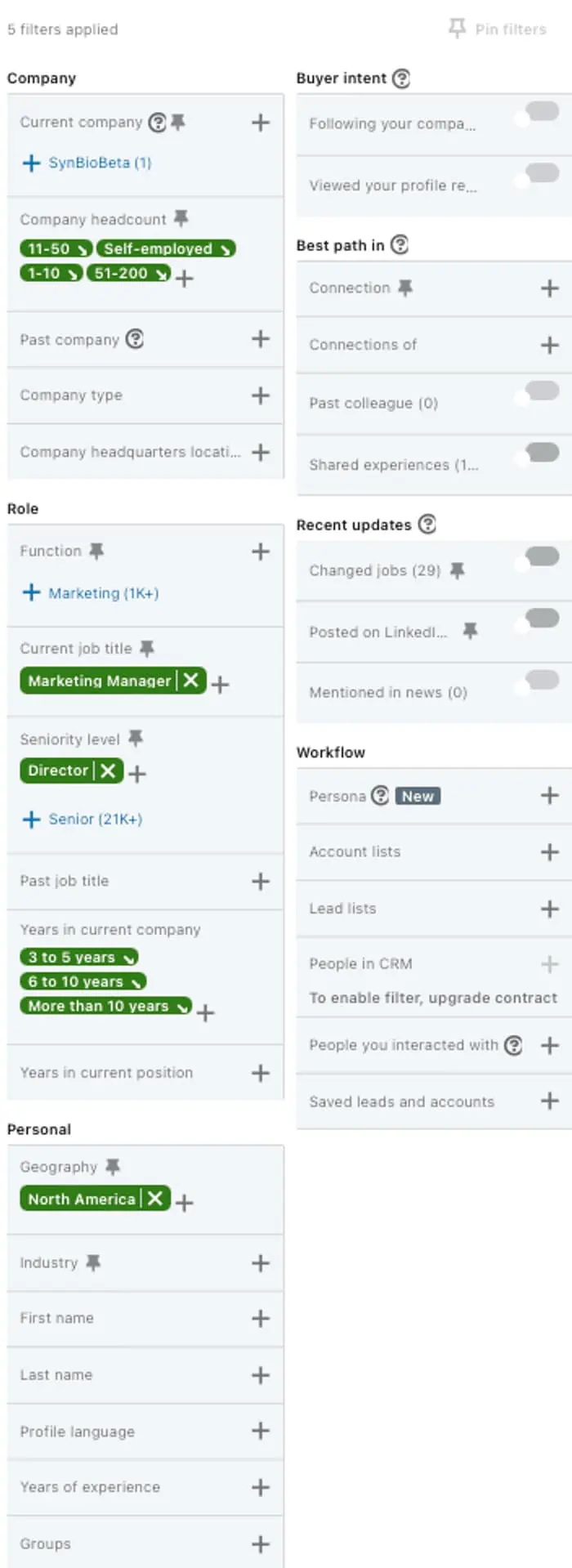
For example, criteria might include title, seniority level, company size, region and number of years with current company (e.g. “marketing manager”, “director” level, in “North America”).
Then it’s exactly the same process as for classic LinkedIn.
c) Set up an automated prospecting sequence
Prerequisites:
- A prospect list must be imported as described above.
- The URL of an online product page must be filled in to provide data to the AI.
Steps to launch your campaign:
- Go to the “Campaigns” tab.
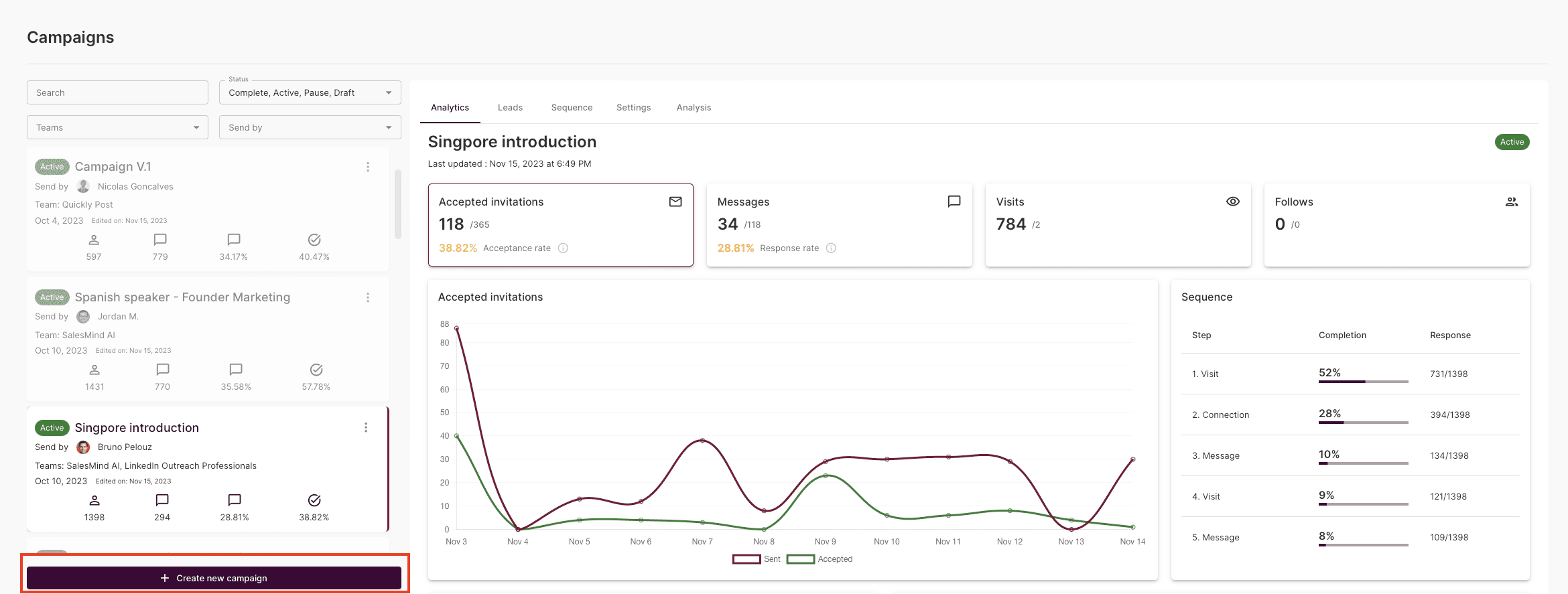
- Create a campaign and select the account from which to launch the campaign.
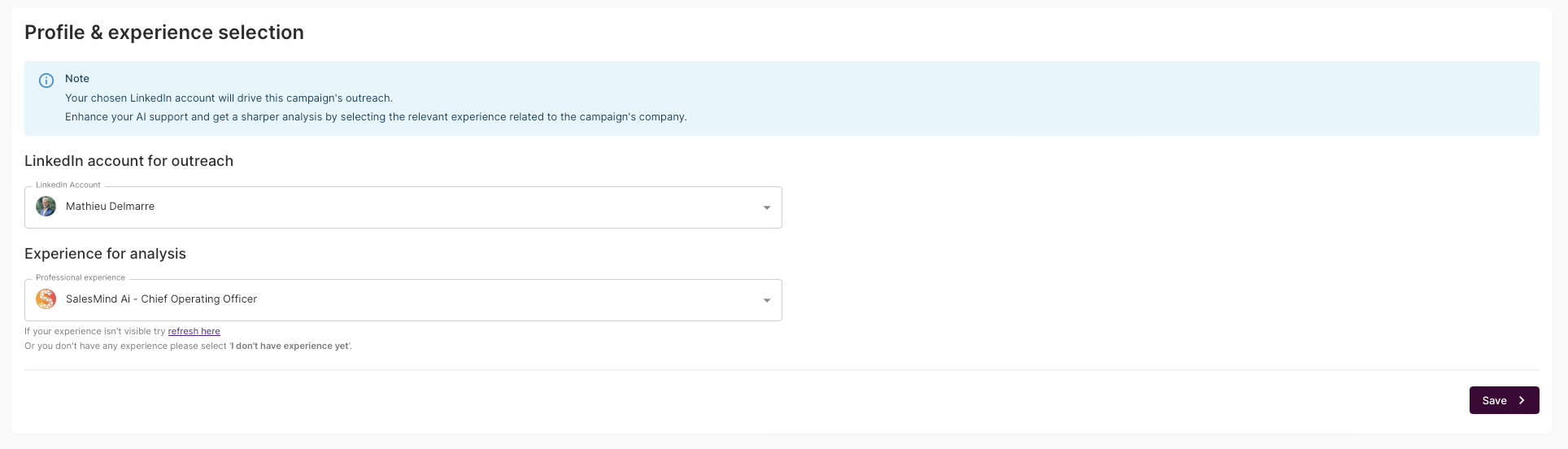
- Fill in the information about your solution and the landing page to send your leads to.
- Select the prospect list you wish to prospect.
- Define your strategy: draft the first messages to be sent to your prospect list.
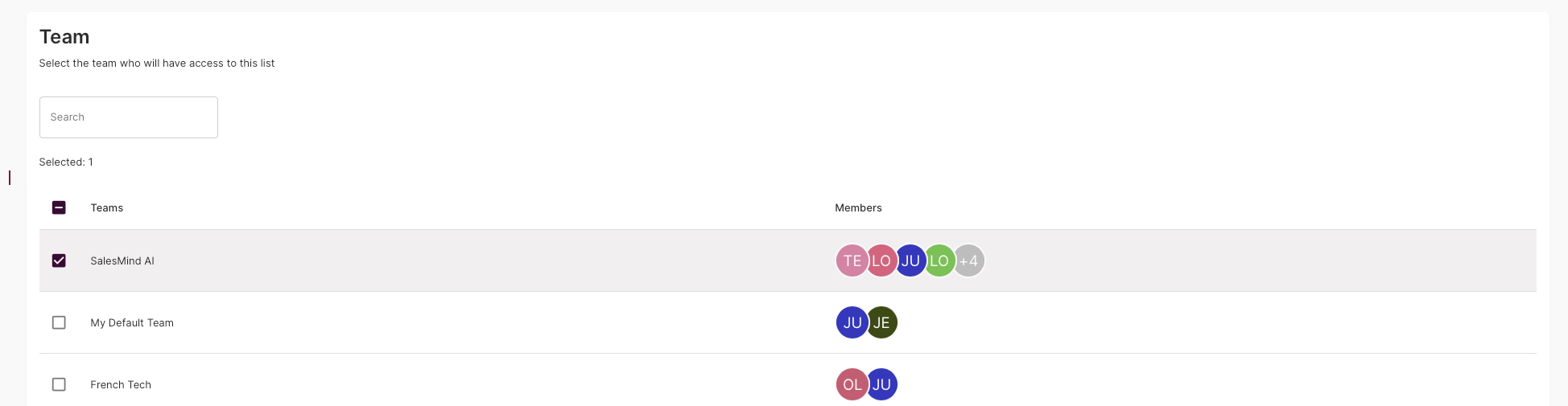
- Collaboration: select the team within which you wish to share the campaign.
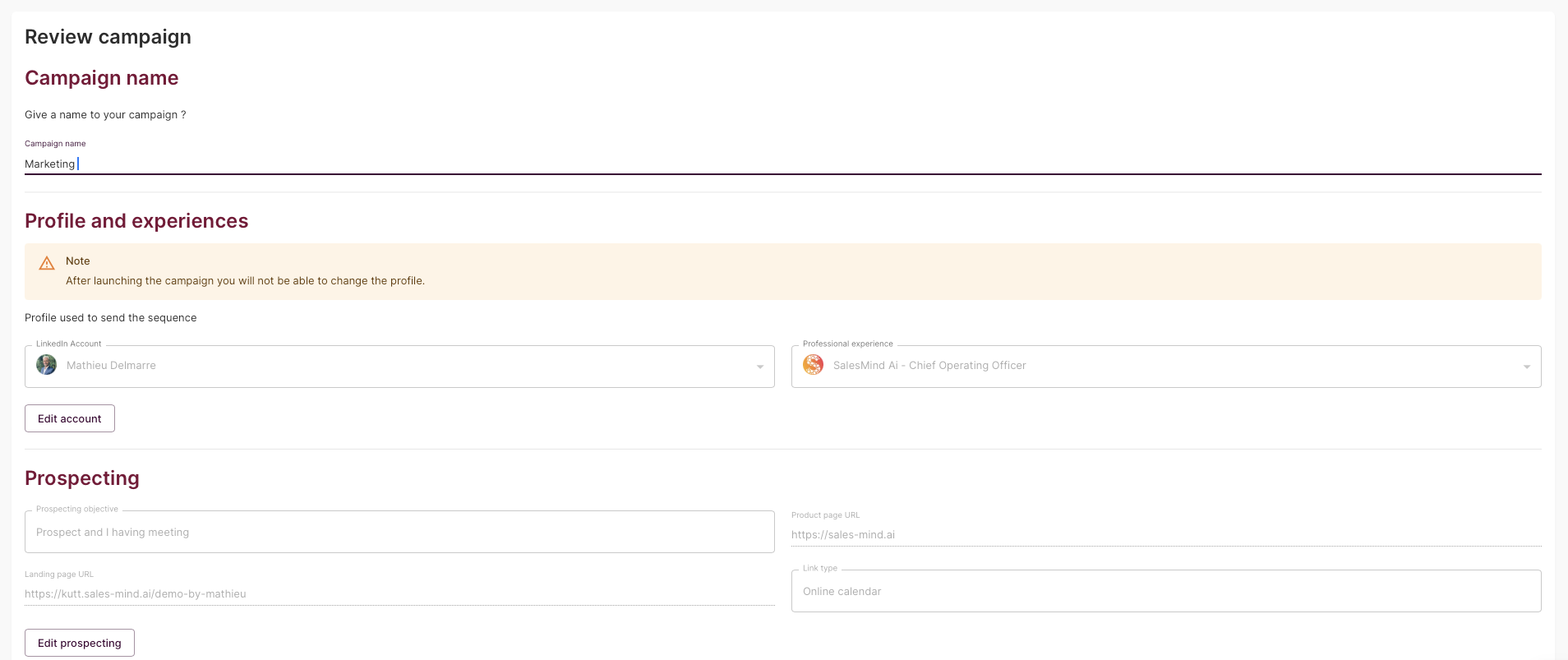
- Take stock of your campaign.

- Done ✅
Why use SalesMind AI with MirrorProfiles?
The combination of SalesMind AI and MirrorProfiles offers a strategic advantage in prospecting and outreach on LinkedIn. Here’s what each one brings:
Increased prospecting capacity with MirrorProfiles
MirrorProfiles rents dedicated LinkedIn accounts, manually warmed up over 4 months with more than 500 real connections, which considerably increases your prospecting capacity. LinkedIn limits each account to 100 to 120 connection requests per week and 40 messages per day, so your volume is proportional to the number of accounts: with 10 accounts, that’s 1,000 to 1,200 connection requests per week. Our clients typically run 5 to 6 MirrorProfiles accounts per salesperson or recruiter.
This extended reach is crucial on a platform where reaching a large audience is key to effective networking and lead generation.
Save time and improve quality with SalesMind AI
SalesMind AI brings automation, personalization and relevance to your messages. This not only saves considerable time, but also improves the quality of interactions. Personalized, relevant messages are more likely to interest prospects, which translates into higher conversion rates.
Scaling your volume with several accounts
LinkedIn limits what a single account can do, and no automation tool changes that. With several dedicated accounts rented through MirrorProfiles, each staying within its own limits, your weekly volume scales, and you can run multi-channel campaigns, which are often more cost-effective than single-channel efforts.
Account continuity for the company
Using personal LinkedIn accounts for automated prospecting puts your colleagues’ own profiles at stake. With MirrorProfiles, the accounts are rented by the company: the network and the conversations stay in the company, even if an employee leaves the organization. And when needed, MirrorProfiles replaces an account in under 48 hours.
Targeted campaigns thanks to verticalization
Segmenting your prospecting efforts by sector or niche becomes possible with several accounts. This enables more targeted, relevant and effective prospecting, especially for companies that create industry-specific content.
Integration with Sales Navigator
The automatic import feature, especially when used with Sales Navigator, streamlines the synchronization of lead lists, making the process more efficient.
Comprehensive outbound strategy
This partnership covers all prospecting activities on LinkedIn, from building the lists to handling the replies. SalesMind AI’s inbox gathers the conversations of every connected account in one place, which keeps the follow-up organized across your accounts.
Conclusion
By integrating SalesMind AI’s advanced AI-driven messaging capabilities with MirrorProfiles’ ability to extend your reach with stable accounts, companies can create a more powerful, effective and efficient LinkedIn strategy. This combination not only maximizes LinkedIn’s potential as a prospecting platform, it also ensures a more structured and efficient approach to LinkedIn networking and sales.
Whether you want to expand your network, generate leads or boost sales, integrating SalesMind AI with MirrorProfiles gives you a strategic advantage. It enables companies to run large-scale, targeted campaigns while keeping their professional presence on LinkedIn stable and consistent.
Are you ready to unlock the full potential of your LinkedIn strategy and get results? Explore SalesMind AI and discover how, with MirrorProfiles, it can change the way you acquire customers on LinkedIn.











